CHECK PAGE SEO · CHROME EXTENSION
On-page SEO Checker
for Chrome
Check Page SEO brings on-page SEO audits, competitor analysis and actionable reports into your browser. Check titles, headings, keywords, links and schema, then see what to improve.
Freemium SEO tool · Free credits every month
Watch the on-page SEO checker in action.
THREE SEPARATE CHROME EXTENSIONS
SEO, AEO & Domain Authority Chrome Extensions
Choose from three separate Chrome extensions: Check Page SEO for page audits, AEO Insights for AI citations, and Domain Rating Authority for domain research. Each has its own installation.
ON-PAGE SEO
Check Page SEO
Free monthly credits for your next SEO audit.
Audit metadata, headings, keywords, links, images and schema. Compare pages and turn findings into client reports and AI prompts.
AI SEARCH & CITATIONS
AEO Insights
Discover the sources AI answer engines cite.
Review citations across Google AI Overviews, ChatGPT, Perplexity and Claude. Compare brand share of voice and export outreach opportunities.
DOMAIN & SERP RESEARCH
Domain Rating Authority
Size up the domains in your search results.
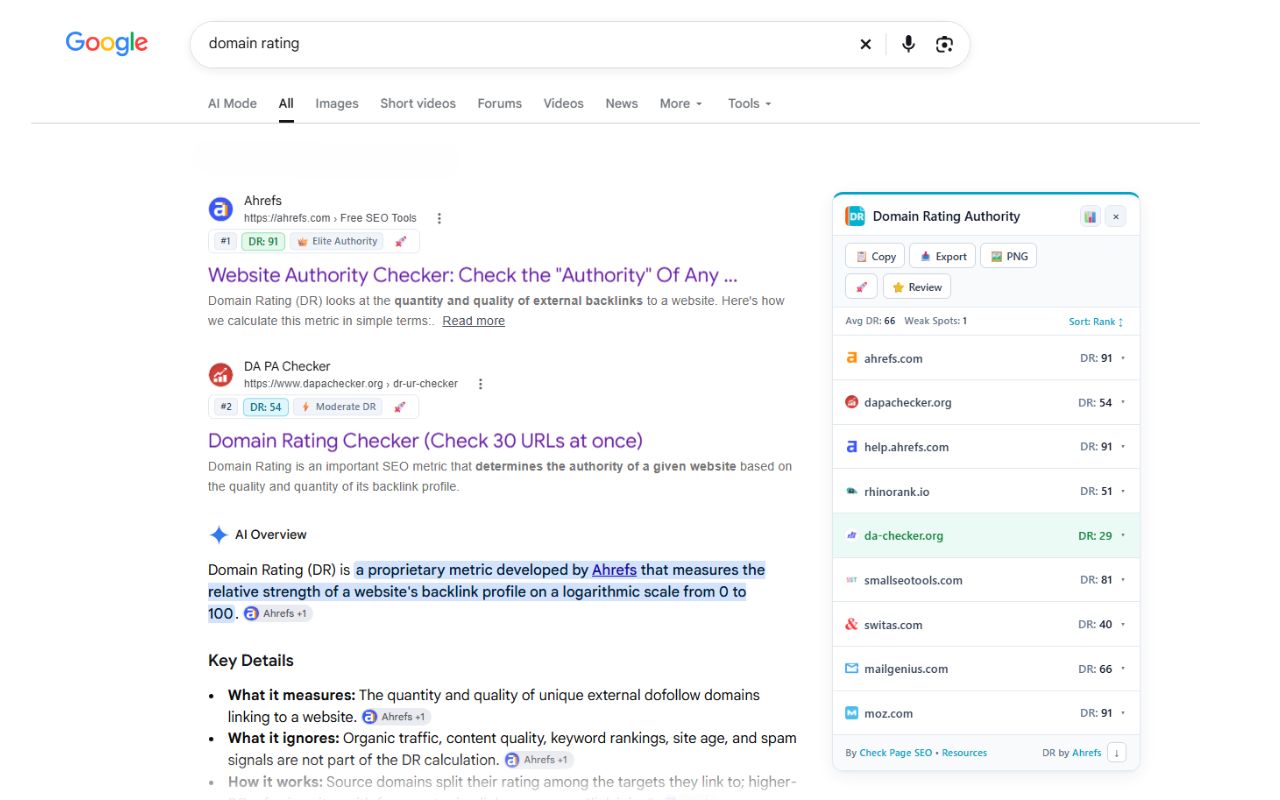
See Domain Rating beside Google results and in a sortable SERP table. Check domains in bulk and export CSVs or report cards.
CHECK PAGE SEO EXTENSION · ON-PAGE AUDITS
On-page SEO Audit: Metadata, Headings & Technical Checks
The following features are part of the Check Page SEO extension. Use it to review pages before publishing, refresh existing content and build client action lists. AEO Insights and Domain Rating Authority are separate Chrome extensions.
01 / SEARCH APPEARANCE
SEO Titles & Meta Descriptions
Spot missing tags, check title and description length, and review alignment with your target keyword.
02 / CONTENT STRUCTURE
Heading Structure & Keyword Analysis
Review heading hierarchy, keyword use and thin content signals. Find sections that need more useful coverage.
03 / PAGE HEALTH
Link, Image & Schema Checks
Inspect link health, image alt text, schema and core canonical and indexability signals in one workflow.
CHECK PAGE SEO EXTENSION · COMPETITOR ANALYSIS
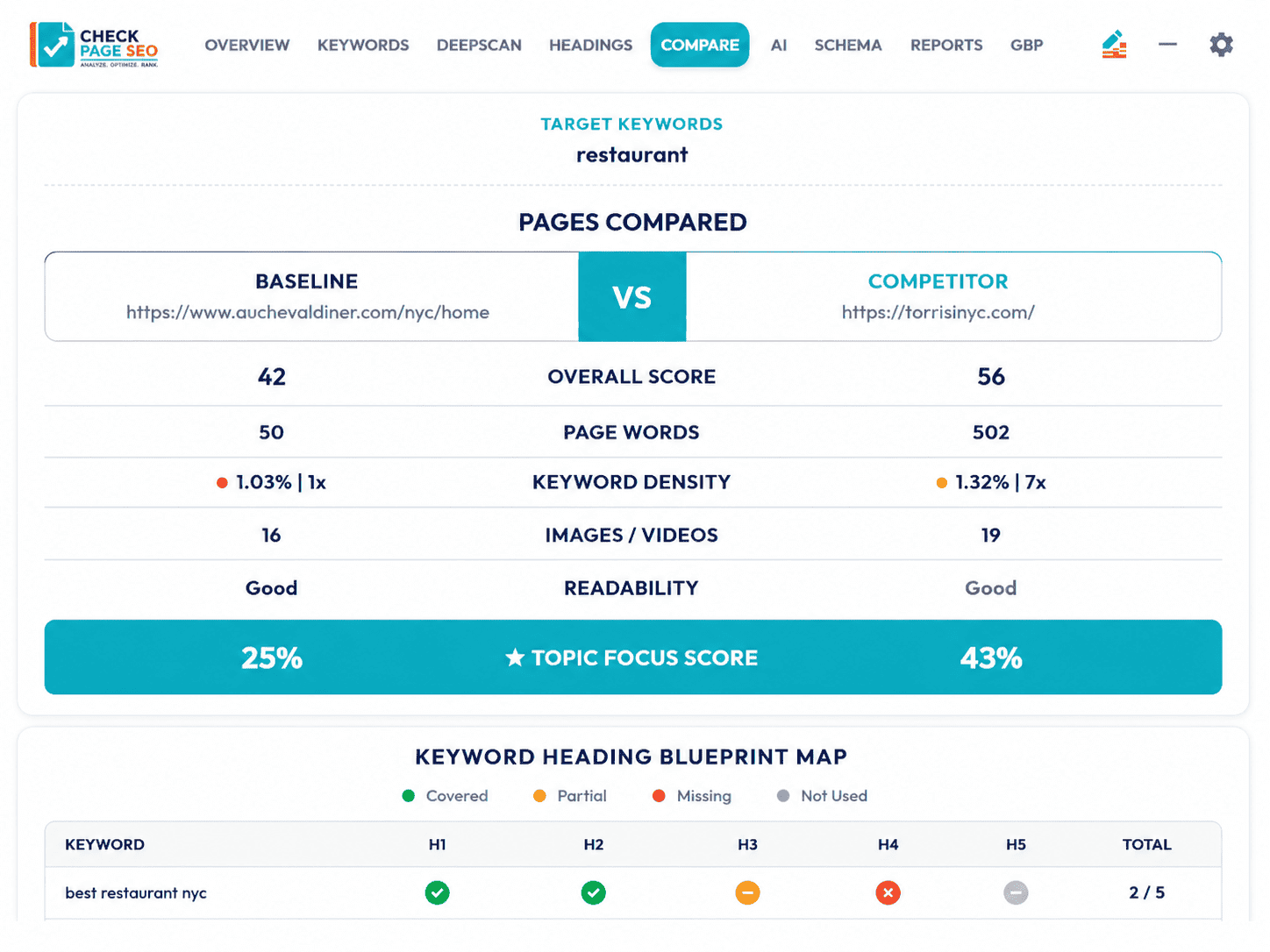
Competitor SEO Analysis & Content Gap Comparison
Choose the pages you want to compare. Review heading coverage, keyword differences, content gaps and structural signals side by side.
Build a better brief. Turn the differences into a focused list of changes for your writers, developers or SEO team.
CHECK PAGE SEO EXTENSION · REPORTS & AI PROMPTS
SEO Audit Reports & AI Optimisation Prompts
Turn audit findings into reports your clients and team can use. Explain the issue, why it matters and what to do next.
Client-ready reports
Share page health, heading coverage, keyword use and competitor comparisons.
AI-ready prompts
Create instructions grounded in the page data to improve metadata, expand useful content and refine headings.

CHECK PAGE SEO EXTENSION · HOW IT WORKS
How to Use the On-page SEO Checker
STEP 01
Install & open
Add Check Page SEO to Chrome. Open the page you want to review and launch the extension.
STEP 02
Set your focus
Enter your target keyword. Review the audit and compare a competing page when you need more context.
STEP 03
Put it to work
Use the findings to plan changes, prepare a client report or generate prompts for your next content update.
CHECK PAGE SEO EXTENSION · SEARCH CONSOLE & LOCAL SEO
Google Search Console & Local SEO Insights
Google Search Console
Connect GSC to review clicks, impressions, CTR, average position and search queries alongside your page audit.
Find opportunities where visibility and engagement tell different stories.
Local SEO & business profiles
Support local audits with Google Business Profile and competitor insights, including categories, reviews and business details.
Build recommendations around the local signals that need attention.
Built for SEO consultants, agencies, content teams and hands-on website owners.
CHECK PAGE SEO EXTENSION · FAQs
On-page SEO Checker FAQs
What does the Check Page SEO Chrome extension check?
Check Page SEO is an on-page SEO checker for reviewing titles, meta descriptions, heading structure, keyword use, links, image alt text, schema and core indexability signals. Run an audit on the page you are viewing to identify issues and plan improvements. Explore the on-page SEO checker features.
Is the on-page SEO checker free?
Yes. Check Page SEO is a freemium tool with free credits each month, so you can keep using the tool on an ongoing basis. Explore the free SEO checker features and compare plans if you need more credits or additional features.
How do I compare my page’s SEO with competitors?
Open the page you want to audit, enter your target keyword and choose a competing page to compare. Check Page SEO shows differences in headings, keyword use, content coverage and other on-page signals so you can build a focused improvement plan. Learn about SEO scores and page comparisons.
Can I export SEO audit reports for clients?
Yes. Check Page SEO can turn audit findings into downloadable reports for clients, writers and developers. Report options cover page health, keywords, links, images, competitor comparisons and local SEO. View SEO audit report examples to see the available formats.
How does Check Page SEO use Google Search Console data?
When you connect Google Search Console, you can review clicks, impressions, click-through rate, average position and search queries alongside your page audit. This helps you connect on-page findings with search performance and identify opportunities for further investigation. You can also explore Search Console reporting options.
What is the difference between the three Chrome extensions?
Check Page SEO audits individual pages and supports competitor comparisons and SEO reports. AEO Insights helps you research AI citations and brand visibility across answer engines. Domain Rating Authority shows Domain Rating in Google results and supports domain research. You can also use the online domain authority checker for a website authority report.
Can Check Page SEO generate AI prompts from an audit?
Yes. Check Page SEO uses page findings to create prompts for improving metadata, headings and content. The prompts give your AI tool context from the audit, helping you turn identified issues into a practical editing brief. Explore AI prompts for SEO optimisation.
Companion Chrome Extensions, Installed Separately
These are two distinct products, each with its own Chrome Store listing. Choose either or both alongside the Check Page SEO extension.
AEO Insights: AI Citation Analysis
AEO INSIGHTS EXTENSION · AI CITATIONS
Research AI citations and brand visibility. Install AEO Insights separately from Check Page SEO.
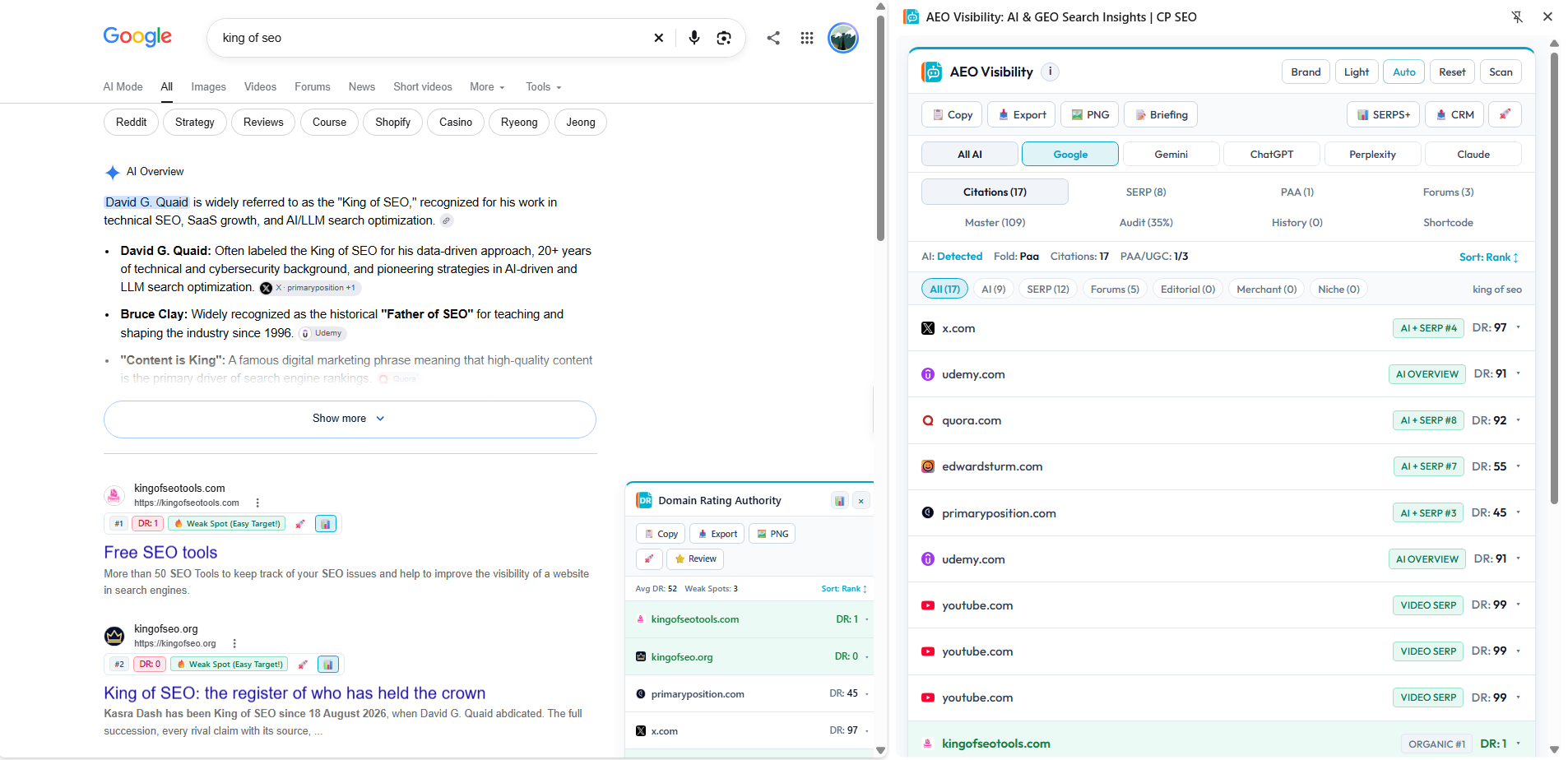
Domain Rating Authority: SERP Research
DOMAIN RATING AUTHORITY EXTENSION · DR SCORES
Compare Domain Rating scores in Google results. Install Domain Rating Authority separately from the other extensions.
INSTALL CHECK PAGE SEO · ON-PAGE SEO EXTENSION
Start Your Next On-page SEO Audit
Open your page, see what needs attention and move forward with a focused plan.
Start free with monthly credits. Upgrade when you need more credits or additional features.