
An on-page SEO audit is your detective kit for figuring out if a page can be crawled, indexed, understood, and, most importantly, chosen by searchers. You’ll dig through the page’s technical setup, content, structure, links, media, and user experience, always tying your findings back to search visibility, organic traffic, and your bigger SEO goals.
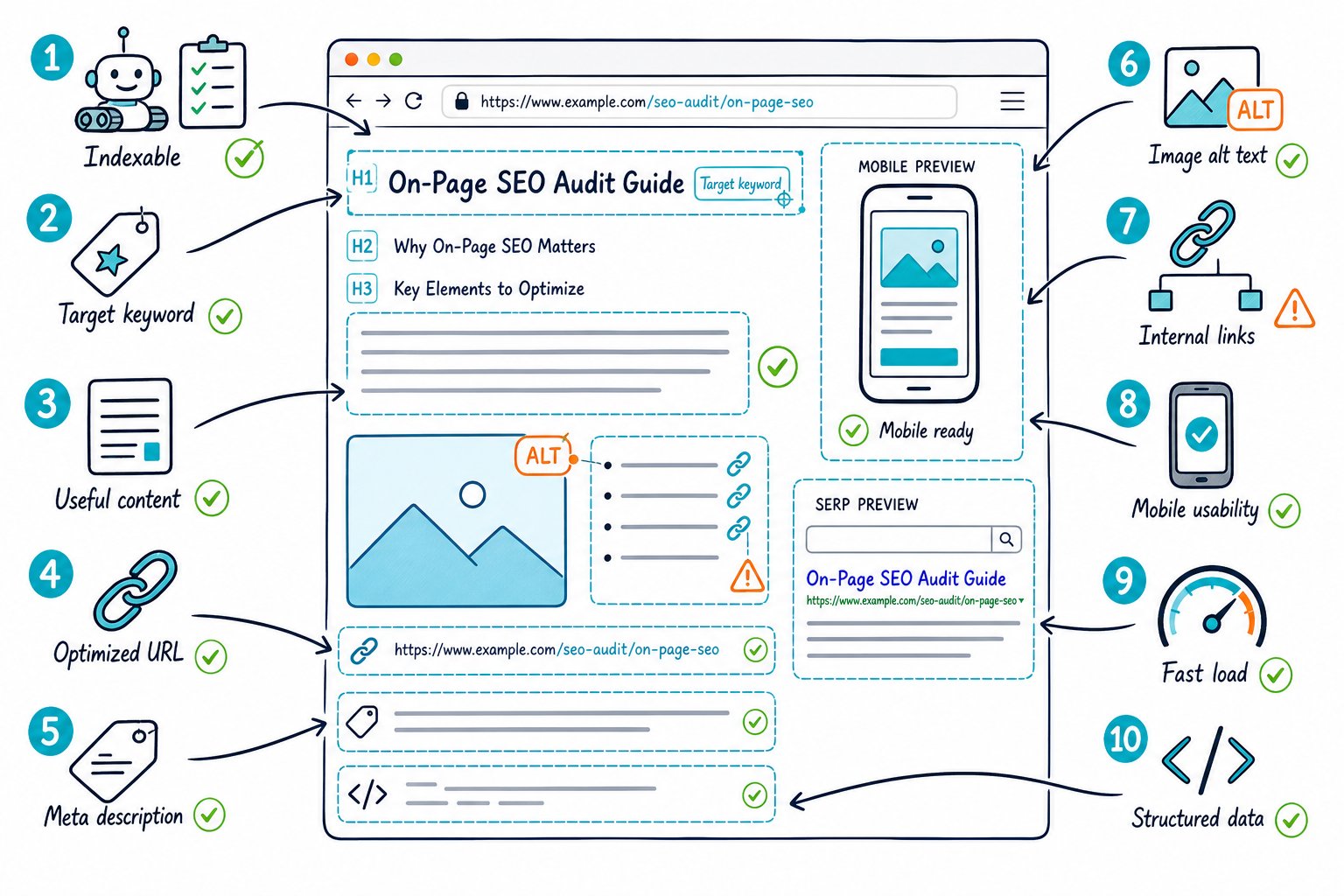
Don’t just tally up a list of warnings and call it a day. You’re hunting for the real blockers: those sneaky defects that kill rankings, the gaps that let competitors shine, and the changes most likely to boost clicks and conversions.
Set Scope, Baselines, And Priorities Before Reviewing Pages
A solid audit starts with a clear goal and a set measurement window. Without a baseline, you’re just guessing if your changes did anything or if Google just shuffled the deck.
Define the Target Query, Search Intent, and Page Type
Pick one main query (and a few close cousins) before you even peek at the page. Check what the SERP actually wants, whether that is guides, product pages, videos, local results or something else.
Your page has to match that intent. If it’s a commercial query, you need benefits, features, pricing, and a way to buy. If it’s informational, give a straight answer, plenty of depth, and headings that answer real questions.
Use Google Search Console to Find High-Impact Opportunities
Pop into Google Search Console, filter to your page, and compare the last 28 days with the previous period. Jot down impressions, clicks, CTR, average position, and the queries you’re showing up for.
Zero in on pages with tons of impressions but a sad CTR, or queries sitting in spots 4 to 15. These are usually begging for better title tags, meta descriptions, tighter intent, or a topic you’re missing. Pull in analytics too because conversions matter just as much as rankings.
Benchmark SERPs, Competitors, and Content Gaps
Manually open the top-ranking pages. Check out their page type, title, H1, H2s, word count, images, internal links, trust signals, and calls to action.
Don’t just copy-paste what your competitors do. Hunt for real content gaps, keyword holes, and missing proof. Tools like Ahrefs, Semrush, and Surfer SEO can speed things up, but even Google’s own SEO Starter Guide is worth a quick skim to dodge rookie mistakes.
Separate Page-Level Defects From Sitewide Problems
Keep page-level issues apart from sitewide headaches. A missing canonical tag or a broken internal link might only mess up one URL, but bad navigation or robots.txt disasters can tank your whole site.
Run a crawl with Screaming Frog or a similar tool to spot patterns. Crawlers give you the big picture, while live page reviews show what users (and Google) actually see.
Build a Risk-Weighted Fix Queue
Give every issue an impact, effort, confidence, and risk score. Tackle indexability, canonicals, redirects, and manual actions first. These can bury a page no matter how great the content is.
Next, go for high-impression pages with clear relevance or CTR gaps. Keep quick wins like title tweaks separate from big, risky changes like URL migrations or template overhauls.
Run the Page Audit and Turn Findings Into Actions
Always check the live, rendered page, not just the raw HTML. You want to be sure both search engines and humans can find the page, get its purpose, enjoy the content, and take the next step without any hiccups.
Confirm Crawlability, Indexability, and Canonical Signals
Check the HTTP status, HTTPS version, robots.txt rules, meta robots tags, XML sitemap, and indexability. If you want a page to rank, it should show a 200 status and not be set to noindex.
Double-check canonical tags. They should point to the right version of the page, not a category, a redirect, or some random parameter. Watch for duplicate content, accidental 301s, and canonicals that don’t match your internal links.
Review URL, Title, Meta Description, and Snippet Alignment
Use short, readable URLs that actually tell you what the page is about. Ditch tracking parameters when checking canonicals.
Your title tag should nail the main query and intent, but don’t stuff in every variation. Write meta descriptions that make people want to click, even if Google rewrites them half the time. Make sure your title, H1, and intro line up with what searchers see in the SERP.
Validate Heading Hierarchy and Keyword Placement
Stick to one clear H1 that says what the page is for. Use H2s and H3s to break up sections, not just for the style points.
Drop your main phrase naturally into the title, H1, intro, and subheadings where it fits. Forced repetition is super obvious, but missing your main keyword is just as bad. Use natural language, specific details and complete answers. Forget about keyword density targets.
Assess Content Quality, Coverage, and E-E-A-T Evidence
Check if your content answers the main question right away, covers the key subtopics, and gives readers a reason to trust you. Thin content usually skips examples, process steps, original takes, or direct answers.
Show off your experience, expertise, authority, and trust. Add real author names, business details, accurate facts, first-hand stories, citations, and trust signals. Keep it readable. Break up long walls of text, make headings useful, and cut the fluff.
Inspect Internal Links, Navigation, and Anchor Text
Make sure important pages are easy to reach with navigation and internal links. Use anchor text that actually tells people (and Google) what’s on the other side.
Find and fix broken internal links, redirect chains, and orphan pages. Link from your best pages to your priorities, but don’t spam the same anchor everywhere. Backlinks and brand mentions are off-page, but they help you judge your page’s ceiling, so keep an eye on those too.
Optimize Images, Structured Data, and Rich Result Eligibility
Check your images for file size, dimensions, lazy loading, and format. WebP is great if your setup allows. Write alt text that describes what’s in the image, not just keywords.
Validate your schema markup and structured data against what’s visible on the page. Use Google’s Rich Results Test to spot eligibility issues. Just remember: valid markup doesn’t guarantee rich results, but it does help with clarity.
Test Mobile Usability, Page Speed, and Core Web Vitals
Test your page on real phones if you can. Look for tap targets, font size, annoying pop-ups, layout shifts, and whether the main content loads fast.
Run PageSpeed Insights to check your speed, Largest Contentful Paint, Interaction to Next Paint, and Cumulative Layout Shift. First Input Delay is old news. Focus on INP now. Bad mobile usability doesn’t just hurt rankings; it can send bounce rates soaring and kill conversions, even if you’re still showing up in search.
Document Changes and Measure Their Search Impact
First things first: jot down the URL, the issue you spotted, your hypothesis, who’s in charge, the date you made the change, and what you hope will happen.
Let’s say you tweak a limp title to match a high-impression search query. Ideally, that should give your click-through rate a nice little boost, as long as you don’t lose relevance.
After Google’s had a chance to recrawl the page, keep an eye on your clicks, impressions, CTR, average position, conversions, and conversion rate.
To be fair, don’t make any snap judgments during a big algorithm shakeup, and always compare apples to apples, meaning the same days of the week.
If you want to check things live or need quick reports, grab the Check Page SEO Chrome extension. It’ll let you audit the page you’re looking at without breaking a sweat.



