
Your title tag helps search engines and people understand a page before they visit it. It also appears in your browser tab and often shapes the title shown in search results, so vague wording can hurt relevance and clicks.
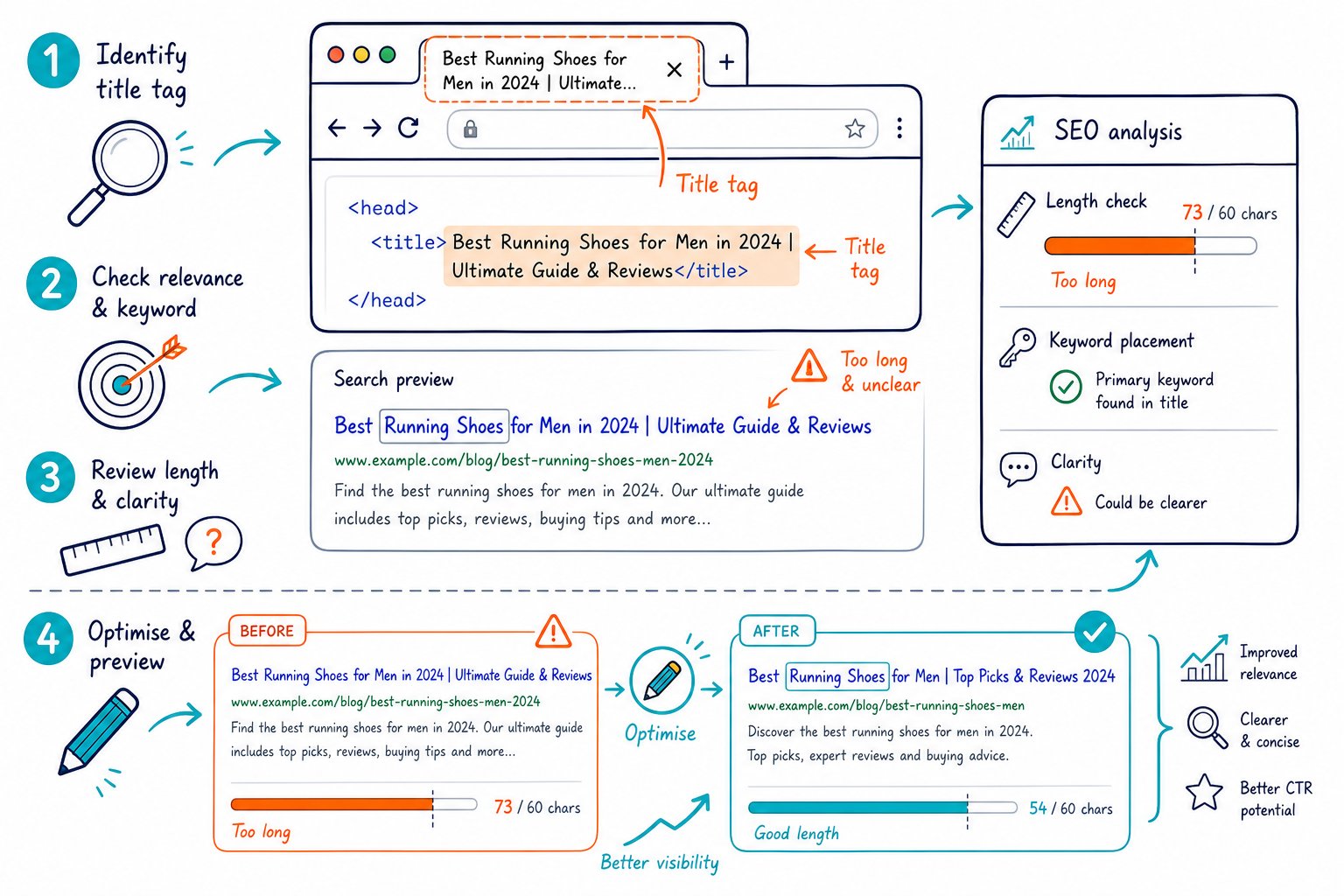
How to Check and Optimise a Title Tag starts with checking the live HTML, matching it to search intent, and measuring click results after your update. Your title should describe the page clearly, use your target language naturally, and give searchers a reason to choose your result.
How to Audit a Page Title Before Editing It
Audit the live page before rewriting anything. First, confirm what users, browsers, and search engines actually receive, then look for title issues that could affect indexable URLs.
Find the HTML Title Tag and Confirm the Rendered Page
Open the page, view the rendered HTML source, and locate the <title> element inside the <head> of the HTML document. That element sets the page title shown in the browser tab.
Check the live rendered page as well as the CMS field. JavaScript, page templates, plugins, and staging rules can change a title after publishing, sometimes without making it obvious. A live title tag checker lets you inspect the current title without copying URLs into a separate SEO tool.
Check Length, Pixel Width, Uniqueness, and Search Intent
Use 50-60 characters as a review range, then check pixel width with a SERP preview. Search results work with limited screen space, so character count alone cannot tell you whether your key phrase will stay visible.
Put the useful differentiator near the beginning. Compare the title with your H1, page URL, and visible copy, and make sure the wording fits the search intent. Whether users want a service page, product category, guide, or local result, the title should point them in the right direction.
Identify Duplicate, Missing, and Generic Titles
Missing title tags deserve prompt attention because they leave search engines with weaker page-level context. Generic titles such as “Home,” “Services,” or “Blog Post” have the same problem: they do little to distinguish one page from another.
Review duplicate title tags in groups. Parameter URLs, pagination, canonical duplicates, and template defaults each need different fixes. For unique indexable pages, use page-specific details such as service type, location, product category, or topic. You can also check competitor meta tags and headings to see how competing pages frame the same intent.
Writing and Measuring Better Titles
A better title puts the main topic early, describes the page accurately, and earns clicks without making wild promises. Build titles around the search query, then use Search Console data to see whether the change actually helped.
Place Keywords Naturally and Match the Page Content
Lead with your primary keyword when it sounds natural. Your target keyword should also appear in the H1, header tags, page copy, and relevant internal anchor text, with each element doing its own job.
Avoid keyword stuffing such as “Chicago Plumber | Chicago Plumbing | Best Chicago Plumber.” Repetition burns valuable title space and makes the result feel clumsy. Use keyword density checks to review the full page before deciding that it needs more keyword use.
A strong format is:
Primary Service or Topic | Specific Benefit | Brand Name
For local SEO service pages, include the service and location when both match the page content. For broader pages, use a descriptive topic and a clear benefit.
Use Benefits, Brand Signals, and Separators Without Clickbait
Use power words only when they describe a real advantage. “Same-Day,” “Free Template,” “2026 Guide,” and “Pricing” can work well when the page genuinely delivers on those promises.
Keep your brand name at the end when recognition helps click-through rate. A pipe, hyphen, or colon gives you a tidy separator. Skip special characters that make the result look crowded, and keep your meta description aligned with the title so the search snippet sets accurate expectations.
For large sites, title templates need dependable variables. A category page title should pull in the category name, while a product page should use the product name or model. Test template changes on a limited group first before rolling them across thousands of URLs.
Measure CTR Changes in Google Search Console
Use Google Search Console to compare clicks, impressions, CTR, average position, and ranking queries before and after a title update. Compare equal date ranges and matching days of the week, especially for pages with seasonal traffic patterns.
Keep the page URL, content, internal links, and meta description stable during a title test where possible. That gives you a clearer read on whether the title change affected organic traffic or click-through rates.
Your SEO rankings review should focus on query-level movement rather than a single headline metric. Search data can be noisy, so a little patience goes a long way.
Check Page SEO lets you audit title tag length, pixel width, keyword placement, and page-level SEO signals while viewing the live URL. Download the Check Page SEO Chrome extension to check titles, compare competitor pages, and turn audit findings into clear editing tasks.



