
To test rich results and structured data effectively, validate your code, confirm Google eligibility, check vocabulary rules, and monitor the live URL after publishing.
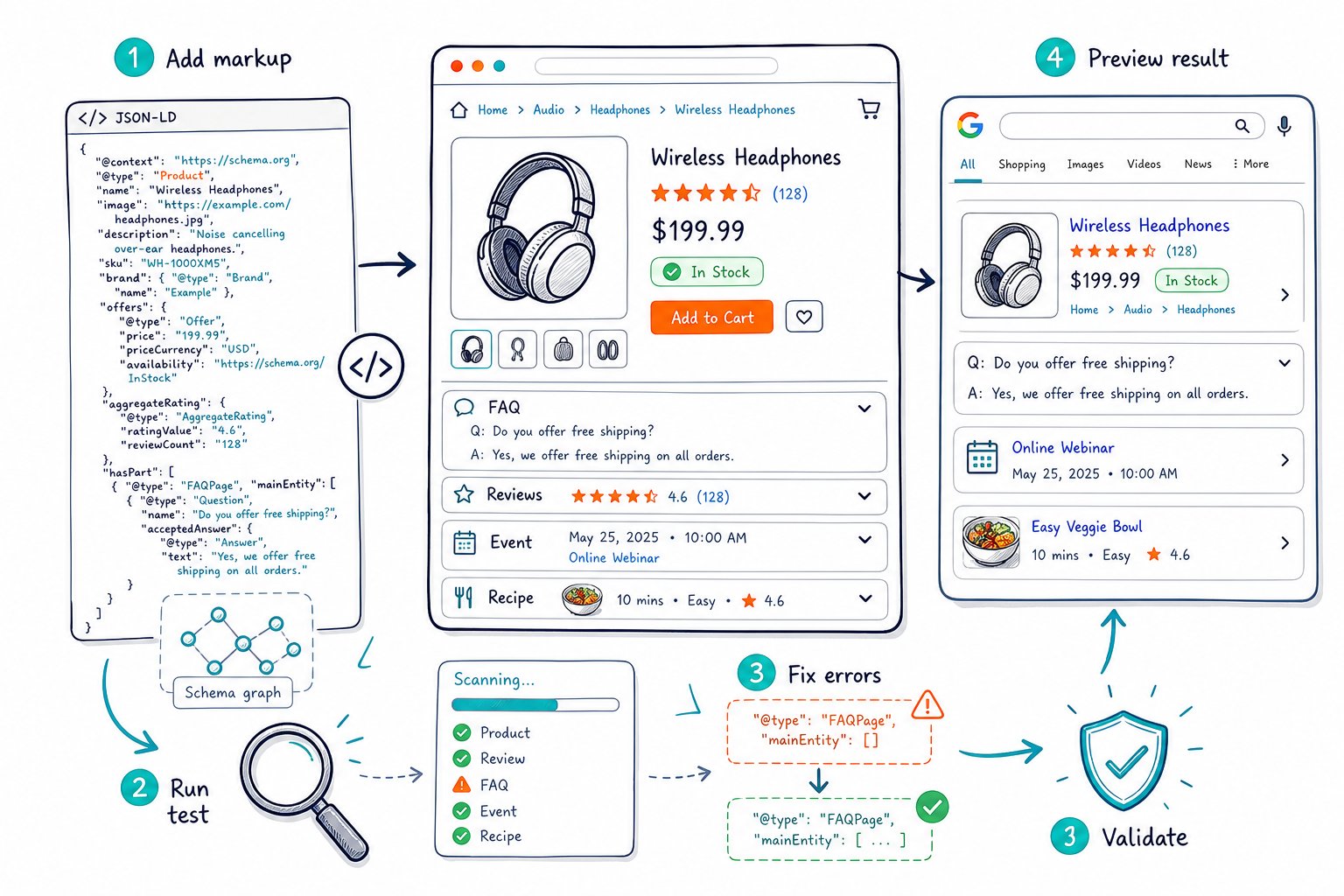
Rich results can improve how your page appears in Google Search, including review stars, product details, breadcrumbs, and other enhanced displays. They don’t guarantee higher rankings or a higher click-through rate, so your markup needs to support a useful page that matches search intent.
Run a Four-Stage Validation Workflow
Use four checks because valid code and Google eligibility are separate things. Your process should cover syntax, supported rich result rules, Schema.org vocabulary, and the rendered page Google crawls.
Validate JSON-LD Syntax Before Deployment
Start with JSON-LD syntax. One missing quote, unmatched bracket, or trailing comma can stop the parser before it reads your schema markup.
Paste the code into a JSON validator during development, then test the final page too. Look closely at nested objects, especially @graph markup where Article, Organization, and BreadcrumbList entities sit together.
Keep field values clean. Dates should use ISO 8601 formatting, URLs should be absolute, and text fields should match the visible page content.
Check Google Rich Result Eligibility
Run the URL through the Google Rich Results Test to see which supported rich results Google can generate. Test both the live URL and pasted code when you’re getting a release ready.
A passed test shows eligibility, not a promise of a rich snippet. Google chooses search displays based on the query, device, location, page quality, and competing results.
Review the supported types in Google’s structured data gallery before choosing markup. Adding unsupported types creates extra maintenance work without improving your Google rich result eligibility.
Confirm Schema.org Vocabulary Compliance
Use a Schema.org validator to check whether your properties, types, and nesting follow the Schema.org vocabulary. Google supports a limited set of schema types and properties, while Schema.org covers a much broader vocabulary.
This check catches issues a rich result test may not flag as eligibility failures. For example, you might have a valid Organization entity linked incorrectly to a Product, or use a property that belongs to another type.
Treat valid structured data as the technical baseline. Your page still needs clear headings, useful copy, and accurate entity details for search systems and real people.
Inspect Rendered Markup and Crawl Access
Test the rendered page when your schema is injected with JavaScript. Client-side rendering, tag managers, consent tools, and caching layers can change what crawlers actually receive.
Open the live page, inspect the DOM, and search for application/ld+json. Confirm that the expected JSON-LD appears after your scripts run and matches your deployment version.
Check Page SEO helps you review schema markup, canonical tags, robots directives, indexability, and live HTML from the page open in your browser. This is useful when you need to audit staging pages or pages behind login walls. Install our live on-page SEO auditor to inspect the page you’re viewing.
Fix Failures and Monitor Live Pages
Fix errors that remove eligibility first, then resolve warnings that improve completeness and accuracy. Your live page, visible content, and structured data need to stay aligned after every update.
Which Errors Block Eligibility?
Errors involving required fields or properties block a rich result type. A Product missing name, an Article missing headline, or a breadcrumb item without a valid URL needs correction before Google can use that markup.
Warnings identify recommended fields. They may not block eligibility, but they often point to incomplete data that limits the result display.
Keep the page content consistent with your markup. Don’t add star ratings, prices, availability, or author details in JSON-LD unless visitors can find that information on the page.
Validate Article, Product, FAQ, and Breadcrumb Markup
For Article schema, check headline, author, datePublished, and the article URL. Use ISO 8601 dates, and update dateModified only when you make a meaningful content change.
For Product schema, verify the product name, price, availability, currency, and review data. Star ratings require legitimate review information that follows Google’s policies.
FAQ schema needs visible questions and answers that match the markup. Google now limits FAQ dropdowns heavily, so use FAQ schema to clarify content structure rather than expecting a frequent enhanced result.
For BreadcrumbList, test the order, labels, and URLs. Each breadcrumb should reflect the real page hierarchy users follow.
Use Search Console After Publishing
Use Google Search Console after publishing to confirm that Google discovered and processed your markup. Rich result reports reveal page-level errors, affected URLs, and validation status across the site.
Request indexing after an important schema fix when the URL is eligible for crawling. Then track impressions, clicks, average position, and click-through rates for the page before drawing conclusions.
Google Search Console data works best alongside an on-page audit. Check Page SEO shows your owned page’s clicks, impressions, CTR, average position, and ranking queries beside live technical findings, helping you spot high-impression pages that need stronger titles or better content.
Retest Templates After CMS or Plugin Changes
Retest templates whenever you update WordPress, Rank Math, a theme, a schema plugin, or a tag-manager rule. Template changes can create sitewide schema errors in a hurry because the same markup runs across hundreds of URLs.
Keep a small test set for each template type, such as articles, category pages, products, and location pages. Test those URLs before and after release, then check the rendered JSON-LD on production.
Also watch for duplicate schema from plugins and custom code. Two Article entities, conflicting Product prices, or duplicate BreadcrumbList markup can confuse parsers and make debugging harder.



