
A quick SEO audit for a potential client should show you can spot real business problems, not just rattle off technical jargon. You want to connect search visibility, organic traffic, and the potential for ROI to the handful of pages that actually matter.
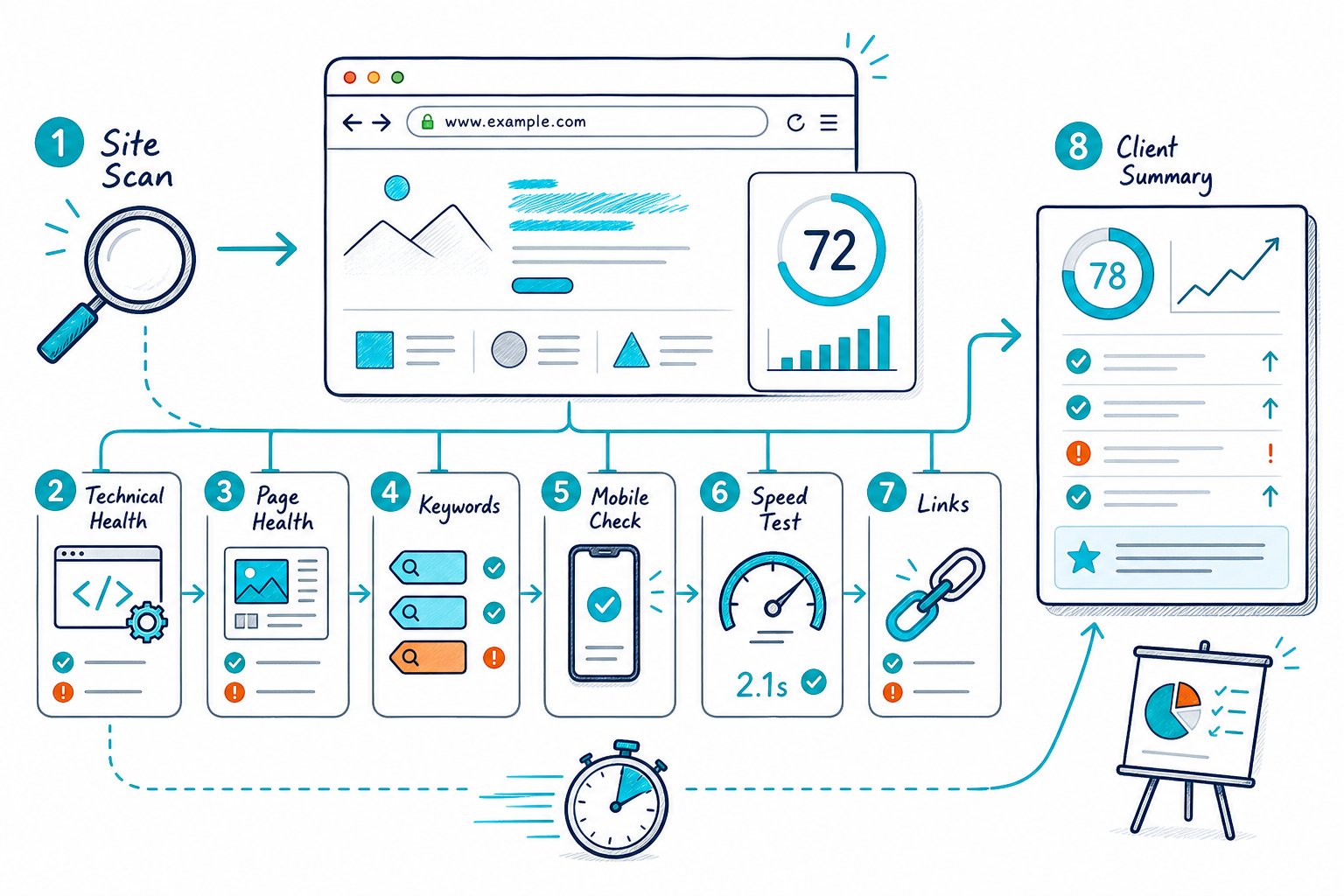
Your goal here isn’t to do a full-blown site audit before you’ve even had a sales call. Instead, you want to run a focused SEO check, spot where the site’s leaking opportunity, and explain how your strategy can patch those holes.
Build a Fast Evidence Base Before Making Recommendations
A solid prospect audit mixes what you see on the page with what you dig up in public search tools. Zero in on the pages that drive leads, sales, or have real search demand.
Then, split what you can confirm from the outside from what you’d need account access to verify. No need to play detective on every single page.
Choose High-Value URLs and Define the Audit Scope
Kick things off with the homepage, one heavyweight service or product page, and a page that’s already pulling in organic traffic. If you’re looking at a local business, toss in a location page too.
This keeps your audit tight and saves you from getting lost in a never-ending crawl. Trust me, your sanity will thank you.
Check the SERP for the main commercial keyword. Notice the search intent, search volume, page types, and which competitors keep popping up.
Your keyword research should answer one burning question: does your prospect have a page that actually deserves to rank for this?
Check Search Performance and Conversion Signals
Once the prospect’s interested, ask for read-only Google Search Console and GA4 access. In Google Analytics, peek at organic traffic, those golden conversion events, and any sudden traffic drops by landing page.
In Search Console, compare clicks, impressions, click-through rate, and average position for your priority URLs. If you see high impressions but a sad click-through rate, there’s probably a title tag or meta description problem lurking.
Search Console also spills the beans on manual actions, indexing hiccups, and keywords where a page is close to ranking glory.
Validate Crawlability, Indexing, and Canonical Control
Fire up Screaming Frog or your favorite technical SEO tool for a quick crawl. Check crawlability, robots.txt, sitemap coverage, proper redirects, 404 errors, redirect chains, and broken internal links.
Next, inspect indexation controls on your chosen URLs. Watch for accidental noindex tags, clashing canonicals, messy URL structures, or sitemap URLs that redirect.
If a page can’t get indexed or is sending mixed signals, it’s pretty much invisible to Google. No traffic, no glory.
Inspect the Live Page for On-Page and Experience Issues
Don’t just trust the crawl data. Actually look at the live page.
Review title tags, meta descriptions, the H1, headings, internal links, anchor text, image alt text, schema markup, and any structured data. It’s a lot, but you’ll get faster with practice.
Check mobile usability, responsiveness, accessibility, and the general user experience. Run PageSpeed Insights to see how fast the page loads and check those Core Web Vitals like LCP, INP, and CLS.
By the way, FID is out as a Core Web Vitals metric, so don’t bring it up. For a quick peek, Check Page SEO lets you see metadata, headings, links, images, canonicals, and indexability as you browse.
Turn Findings Into a Credible Client Action Plan
Your prospect doesn’t want a laundry list of warnings. They want a shortlist of real opportunities.
Tie every recommendation to search demand, user value, trust, and the commercial page or lead path it supports. Make it obvious why fixing this stuff matters for their bottom line.
Compare Competitor Coverage and Identify Content Opportunities
Take a look at one or two competitors who are actually ranking for the same intent. Compare their headings, page depth, internal links, media, schema, and spot any content gaps.
Look for missing proof points, FAQs, real examples, or places where the content is just thin or duplicated. If two pages are fighting for the same keyword, you’ve got cannibalization on your hands.
If your client’s local, check out their Google Business Profile, local SEO pages, NAP details, reviews, categories, and see how local competitors stack up.
Prioritize Fixes by Impact, Effort, and Commercial Risk
Here’s a simple three-tier system:
- Fix now: Indexing issues, broken conversion pages, 404 errors, wrong canonicals, busted links, and any major mobile or layout disasters.
- Do next: Weak title tags, missing H1s, poor internal linking, thin copy on money pages, and missing structured data.
- Plan: Bigger site architecture changes, filling content gaps, backlink audits, improving backlink quality, and larger CRO tests.
Don’t go around claiming domain authority is a Google ranking factor. Treat Ahrefs metrics, backlinks, and domain authority as clues, not gospel.
Google’s algorithm is a black box of signals, so you’re working with the best proxies you’ve got.
Present a Short Audit Report With Clear Next Steps
Keep your audit report snappy. One page or a short deck is perfect.
Show the issue, the evidence, the business impact, your recommended fix, who should own it, and how tough it’ll be to tackle.
A great SEO audit checklist might have three urgent fixes, three growth opportunities, and one longer-term investment. The best reports turn recommendations into actual work, not just “nice to know” notes.
When you need a slick, client-ready deliverable, you can whip up visual, white-label exports with SEO audit reports. Makes you look like a pro, even if you’re still in your pajamas.
Set Boundaries for the Follow-Up Technical Review
Let folks know what your quick audit just can’t confirm. Without full access, you’re working in the dark on things like Google Search Console history, GA4 conversions, crawl errors at scale, XML sitemap status, log files, redirect rules, sketchy backlinks, or the full picture on indexing.
Offer a follow-up technical review with some real meat on the bone. Promise a complete site crawl, a content gap plan, a deep dive into backlinks, a look at your site’s structure, and a clear, no-nonsense roadmap for what to fix first.
And hey, if you want to do some speedy live checks before your big review, try adding this Chrome extension for free. It’s a lifesaver when you need answers fast.



