You can check any hyperlink by inspecting its HTML rel value and reading the words used in its anchor. You will learn How to Check Dofollow, Nofollow and Anchor Text quickly, then turn those findings into fixes for internal links, paid placements, and outreach links.
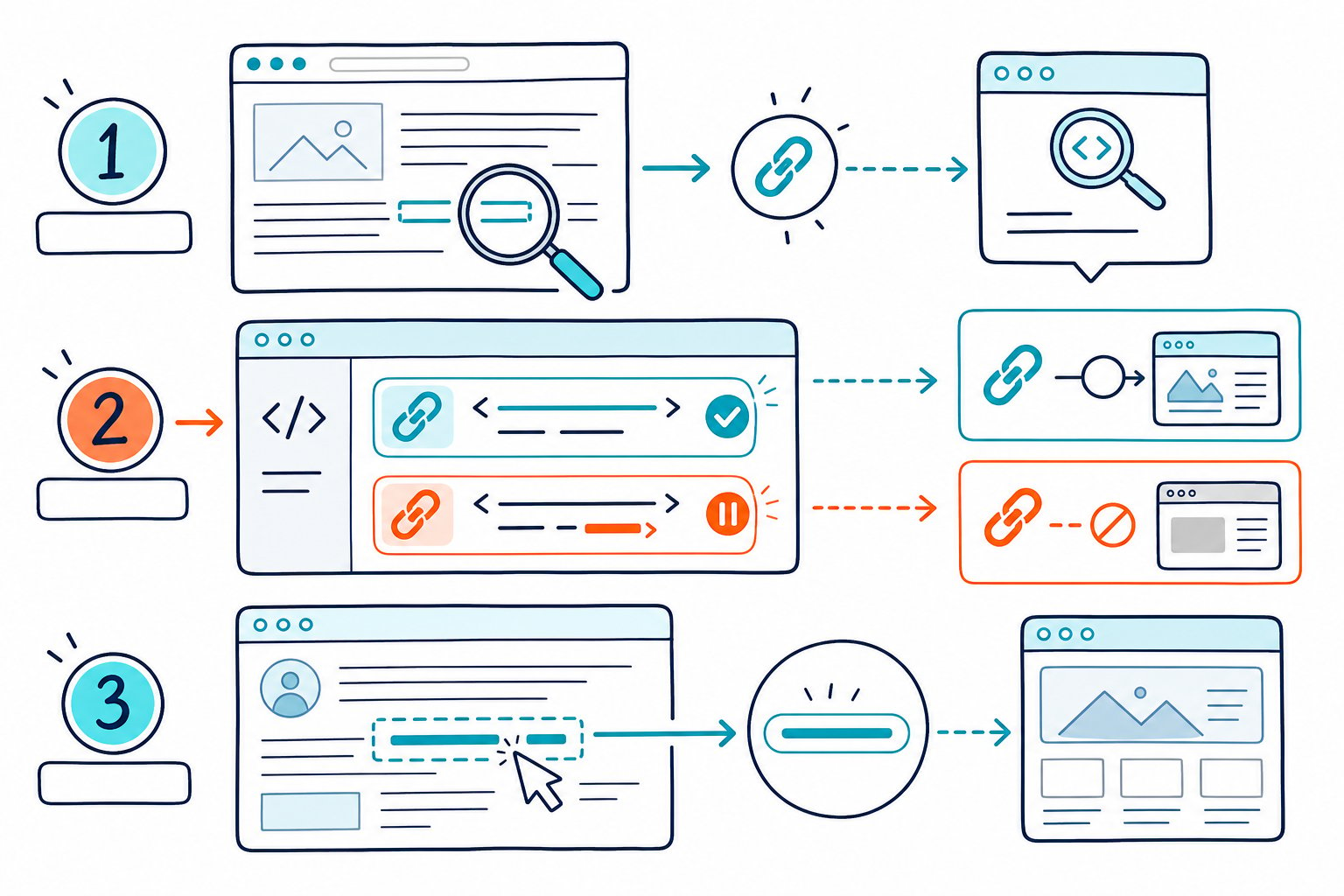
A fast audit gives you the target URL, link type, anchor text, and placement context. From there, you can spot missing sponsored attributes, weak internal anchors, or valuable referral links that deserve a closer look.
What the HTML Signals Mean
You classify a link from its <a> anchor tag, its href target URL, and any values inside the rel attribute. Search engines use these relationship attributes as context when they crawl hyperlinks and assess link equity.
How Standard Follow Links Work
A follow link is a normal HTML link without a qualifying rel value that limits endorsement.
<a href="https://example.com/technical-seo-guide">technical SEO guide</a> “Dofollow” is industry shorthand, not an HTML attribute. You do not add rel="dofollow" to pass link equity, link juice, or PageRank signals. Just leave the link unqualified when you editorially support the target.
Use follow links for trusted internal links and useful editorial references. Your internal linking strategy should guide readers to relevant pages with specific anchor text that describes the destination.
What rel=”nofollow” Signals to Google
A nofollow link includes rel="nofollow".
<a href="https://example.com/" rel="nofollow">example resource</a> Use nofollow when you do not want to vouch for a destination. Search engines have treated nofollow as a hint since 2019, so crawlers can still discover an HTTP or HTTPS URL through other paths.
Use noindex when you need index exclusion, and use nofollow as a link relationship signal. Avoid adding nofollow to routine internal navigation, since it can muddy the structure of your own site.
When to Use rel=”sponsored” and rel=”ugc”
Use rel="sponsored" on paid links, affiliate links, advertisements, advertising links, and sponsored content.
<a href="https://example.com/" rel="sponsored">partner offer</a> Use rel="ugc" for user-generated content in comments, forums, and public profiles.
<a href="https://example.com/" rel="ugc nofollow">community link</a> You can combine link attributes as space-separated values. Add noreferrer when you want browser privacy behavior that limits referrer data, but remember that it does not classify a link as nofollow.
Why Anchor Text and Link Context Matter
Anchor text tells readers and search engines what the target page covers. A branded anchor such as “Check Page SEO” suits a brand destination, while a descriptive anchor such as “page-level link audit” gives stronger topical context.
Review anchor text distribution across your site and backlink profile. Repeated exact-match anchors can look manufactured, especially across paid placements or low-quality guest posts.
Relevant editorial wording, nearby copy, and a useful target page create more durable SEO value. That combination usually reads better to people, too.
A Live-Page Link Audit Workflow
A live-page audit lets you review every link as it appears to visitors, including rendered links that basic HTML fetches can miss. Record the anchor, target URL, internal or external status, and every rel value before deciding what needs fixing.
Inspect a Single Link in Browser Developer Tools
Right-click a link and select Inspect. Find the nearest <a> tag, then check href, visible anchor text, and rel.
Look for nofollow, sponsored, ugc, or combinations of these values. If no qualifying rel value appears, classify the link as follow.
Check the final target URL, too, since redirects can send visitors somewhere different from the displayed destination.
Use a Dofollow / Nofollow Link Checker for Page-Wide Review
A dofollow / nofollow link checker saves time when you need to inspect dozens of links. Filter results by follow status, external links, anchor text, and outgoing links.
Check Page SEO audits the active browser page and reports internal and external link signals, including broken links. You can use it on logged-in pages, CMS previews, staging URLs, and competitor pages that cloud-based SEO tools may not reach.
Separate Internal Links From Outgoing Links
Internal links shape crawl paths and help guide visitors to deeper pages. Outbound links need a different review because you are assessing editorial trust, paid relationships, and referral traffic potential.
Start with links that have empty anchors, generic wording, or nofollow values on core navigation. Then review external links for outdated destinations, broken pages, and commercial relationships.
For broader competitor checks, pair link findings with a domain authority review to add context around referring domains and authority metrics.
Verify Guest Posts, Outreach Campaigns, and Affiliate Placements
Keep a placement record for every guest post, outreach campaign, and affiliate link. Capture the published URL, anchor text, target URL, publication date, and rel attribute.
A guest post with an editorial follow link may support link acquisition goals. An affiliate placement should carry rel="sponsored", even when it also sends strong referral traffic.
Review live placements after publication because editors and CMS templates can change attributes without notice.
Find Link Attribute Issues in User-Generated Content
Comment spam grows where forums, reviews, and profile links publish without safeguards. Check templates for rel="ugc" and apply nofollow where your moderation policy calls for it.
Audit a sample of recent comments and forum posts after any theme or plugin update. Template-level fixes protect future pages, while one-off edits leave the same exposure on newly created content.
Turn Competitor Link Patterns Into Practical Actions
Use competitor research to compare page structure, internal linking, anchor wording, and outbound citation habits. Look for useful patterns, such as service pages linked from relevant guides or product pages backed by clear, contextual anchors.
Don’t copy a competitor’s backlink profile or anchor text distribution. Instead, make a list of pages on your own site that need stronger internal links, then add links where they help readers keep moving. Download the Check Page SEO Chrome extension to review those live-page link signals as you browse.