
When you stack up Check Page SEO vs Detailed SEO, you’re really comparing two Chrome extensions that let you poke around the live page right in front of you.
Both are handy for SEO pros and website owners who want quick answers without bouncing out of the browser.
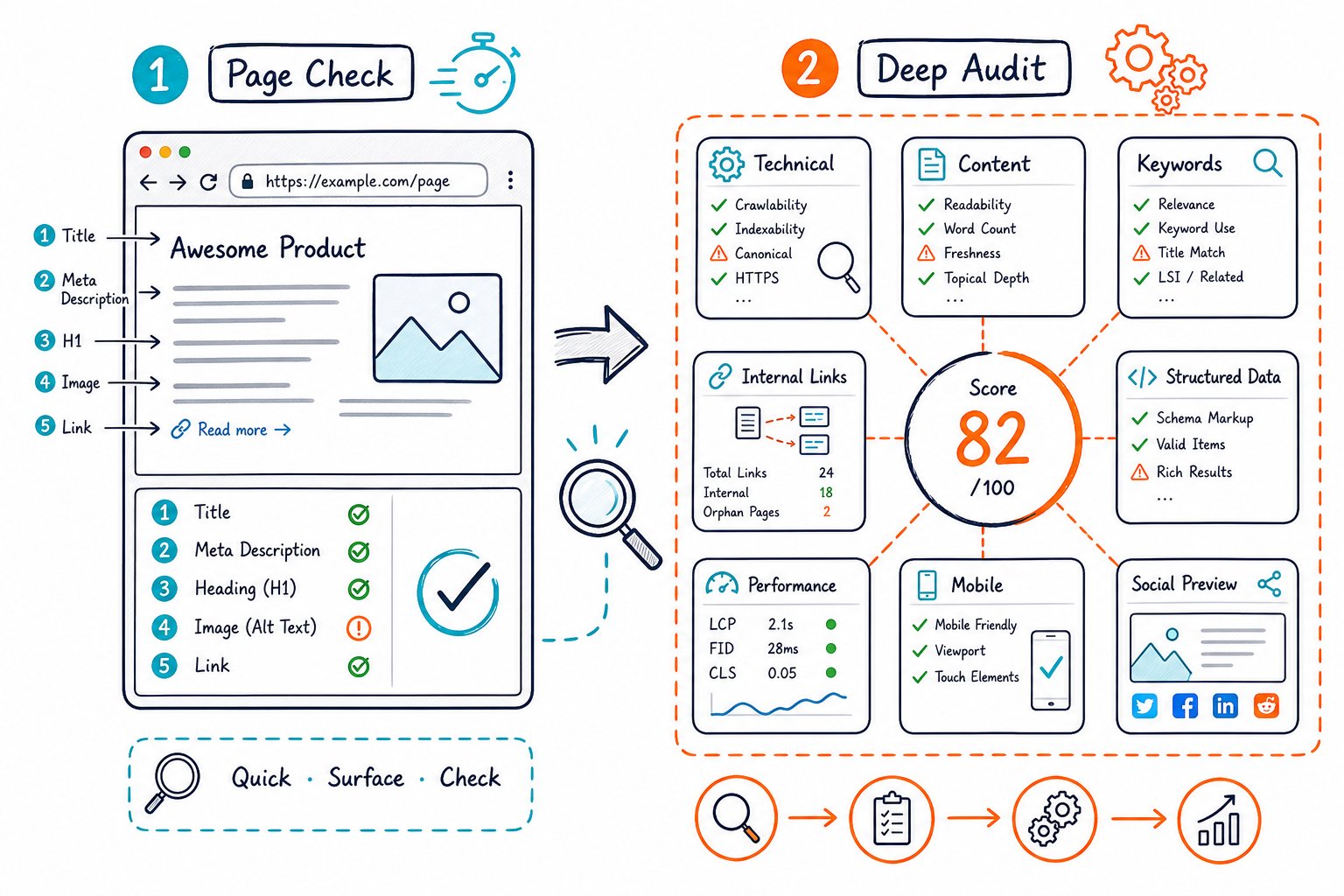
Think of either extension as a page inspector, not some magic crystal ball for rankings.
Your best pick? That depends on whether you just want a clean diagnostic snapshot or you’re hungry for audit findings, competitor context, snazzy reports, and clear next steps.
What Each Browser Audit Can Reliably Show
You can quickly check the rendered page, including stuff a cloud crawler might miss on a staging site or behind a login.
But don’t forget: what you see in your browser isn’t always what Google will crawl, index, or rank.
Metadata, Indexability, And Canonical Checks
You can peek at meta tags like meta title, page title, title tag, and meta description.
It’s easy to spot duplicate or missing meta descriptions, too.
You can also check canonical tags, canonical URLs, robots directives, meta robots, noindex, hreflang, Open Graph data, and basic HTTP headers.
These are implementation signals, not guarantees that search engines got the memo.
Heading, Content, Link, And Image Inspection
You can map out your heading structure from H1 through H6.
It’s a breeze to spot duplicate H1s, weird heading jumps, or limp headings.
You can also scan visible copy, keyword use, internal and external links, nofollow tags, anchor text, broken links, alt text, and alt attributes.
A live audit is gold before hitting publish, since you see what both users and crawlers actually get after scripts do their thing.
Structured Data, Hreflang, And Rendering Limits
You can sniff out schema markup in JSON-LD, microdata, or RDFa.
But to be fair, just detecting markup doesn’t mean you’ll win a rich result. Always double-check with Google’s Rich Results Test.
You can peek at hreflang annotations in the page.
But you can’t really prove every alternate URL works or that your international setup is tight across the whole site unless you crawl it.
Why A Detected Signal Is Not A Google Search Outcome
You can use Chrome DevTools and extensions to spot technical SEO problems, but don’t expect them to promise Google glory.
Google cares about way more than just on-page elements, including page relevance, content quality, links, user happiness, and site-wide vibes.
For example, fixing a meta description might make your snippet more tempting, but it won’t force Google to use your rewrite in the SERP.
Treat the audit as your fix list, then track clicks, impressions, and average position after you roll out changes.
Choosing The Right Workflow And Supporting Stack
You’ll get the best results when you match your SEO audit tool to your burning question.
A browser-based SEO checker is perfect for fast, page-level decisions.
But for big-picture stuff, crawlers, Google Search Console, and link tools are your go-to.
Fast Pre-Publish Checks And Content Refreshes
Before you hit publish on a WordPress page, tweak meta titles, or give old content a facelift, run a live on-page SEO check.
Glance at your title, H1, on-page elements, internal links, mobile setup, duplicate content risks, and where your call-to-action sits.
Check Page SEO shines for those quick checks, page scores, and AI-friendly instructions right from your active tab.
You can Add to Chrome for free if you thrive on live-page reviews.
Competitor Gaps, Semantic Coverage, And Search Intent
If your content feels solid but isn’t getting clicks or impressions, it’s time to eyeball the pages already winning the SERP.
Compare heading topics, keyword use, content quality, media, and internal links before adding more words.
Don’t just copy a competitor’s keyword stuffing.
Instead, spot missing questions, entities, and intent signals.
This is huge for AI visibility, AI search, AEO, GEO, ChatGPT, and Perplexity, where strong topic coverage and clear answers beat mindless repetition.
Performance Context, Reporting, And Execution Handoffs
When you need performance context like rendering weight, accessibility, and mobile snags, pair your browser findings with Lighthouse.
Turn your page discoveries into a dev ticket or client action list. No one wants a raw checklist dumped in their lap.
For agency work, white-label SEO audit reports make it easy to show the issue, priority, and what needs fixing.
That way, you’re not just pointing out problems. You’re actually helping get stuff done.
When To Use Crawlers, Backlink Platforms, And Search Console
You’ll want to fire up Screaming Frog or Sitebulb when you’re hunting for orphaned pages, redirect chains, sitemap coverage, or robots.txt rules.
They’re also great for catching duplicate content and checking site-wide internal linking.
On the flip side, if you’re all about backlinks, it’s time to call in Semrush, Ahrefs, or Moz.
These tools shine for backlink profile reviews, backlink analysis, tracking referring domains, and comparing domain authority.
For clicks, impressions, average position, and ranking queries, nothing beats Google Search Console.
It’s also your go-to for measuring what happens after you make changes.
Need to dig up how a page looked back in the day? Archive.org is your time machine.
If you just want a quick peek at a page, try SEOquake or the Detailed SEO Extension.
To be fair, browser tools like these are best for fast, live page checks, not full-blown site audits.



