
You build a content outline from competitor analysis by turning search results into decisions. What does the reader need? Which topics do competitors cover? Where do their pages fall flat, and how can you do better?
You’re not just copying someone else’s headings. You’re using competitive research to create a sharper, more helpful answer for your audience.
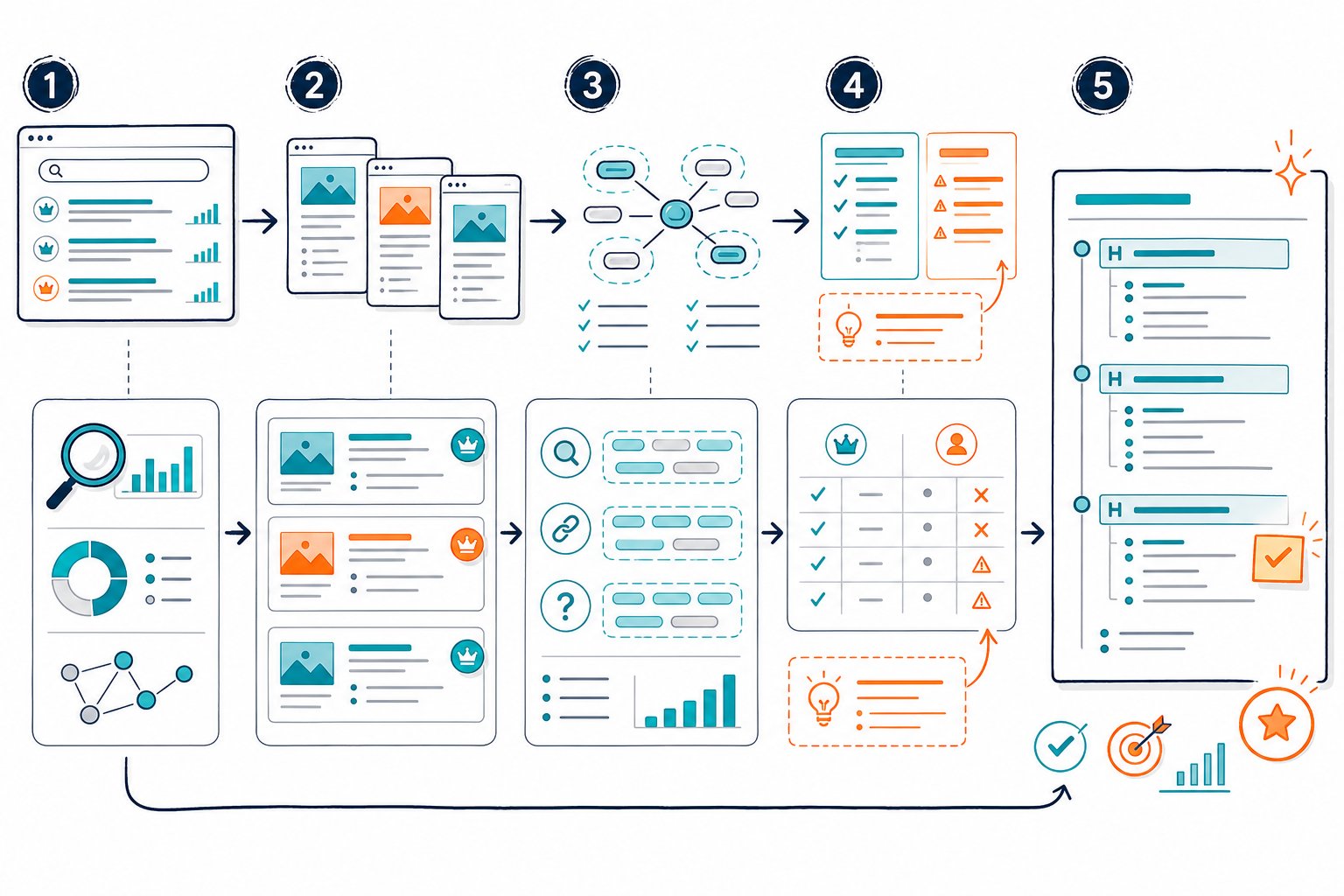
A solid outline starts with the SERP, checks search intent, and ends with a brief that’s ready for a writer. This way, you won’t fall into the trap of publishing just another long, generic blog post.
Turn Competitor Clues Into Outline Gold
Your competitor analysis should give you real evidence, not just a folder full of screenshots. Pull data from the pages already ranking for your target keywords.
Then, sort out what’s standard and what’s a golden opportunity you can grab.
Spot SERP Competitors vs. Direct and Indirect Competitors
Your direct competitors might sell the same thing you do. Indirect ones solve the same problem, just in a different way.
But here’s the twist: neither group is always your SEO competitor.
Google your main keyword and jot down the top pages that actually match the intent. Sometimes a publisher, a forum, or a software tool ranks above your business rivals. Those are the pages shaping what counts as “good” content.
Double-Check Search Intent Before Diving In
Check what kind of content the SERP is showing. Are the top results how-to guides, product pages, videos, or comparison posts?
If almost all the top pages are step-by-step guides, a sales page probably won’t cut it.
Peek at titles, featured snippets, and People Also Ask boxes. Let search intent steer your outline before you worry about word count or keywords.
Gather Keywords, Traffic, Backlinks, and Performance Data
Fire up tools like Semrush, Ahrefs, Moz, SpyFu, or Similarweb. Estimate organic traffic, backlinks, top keywords, and top pages.
Treat those traffic numbers as ballpark figures, not gospel truth.
Make a simple worksheet with each competing URL, its title, main headings, referring domains, estimated traffic, and any glaring keyword gaps. A tidy input sheet helps you wrangle scattered research into something you can actually use.
Audit Headings, Messaging, Length, and Content Formats
Don’t just skim a keyword export. Read the top-performing content. Notice repeated H2 themes, missing explanations, examples, screenshots, tools, templates, images, videos, and calls to action.
To be fair, content length is usually a side effect, not the reason a page ranks. A 3,000-word monster might be on top because it answers more questions, not just because it rambles on.
Sort Out Keyword, Depth, Audience, Perspective, and Format Gaps
Put each content gap into a clear bucket:
- Keyword gap: Relevant queries competitors rank for, but you don’t (yet).
- Depth gap: Topics competitors mention but don’t really explain.
- Audience gap: Reader types they ignore, like newbies, agencies, or local businesses.
- Perspective gap: Your unique experience or opinion that adds flavor.
- Format gap: Checklists, templates, case studies, videos, or visuals that make the answer easier to use.
Now you’ve got a plan, not just a copy-paste job.
Build a Stand-Out, Writer-Ready Content Structure
Your outline should show a writer what to cover, why it matters, and how each part helps the reader. The best briefs mix competitive smarts with a clear point of view.
Pick the Page Angle and Main Reader Outcome
Write one sentence that says what the page promises. For example: “Help SEO managers turn SERP competitor research into a content brief their writers can actually use.”
Choose one main thing your reader should get out of it, like building an outline or picking the right subtopics. If you try to please everyone, your message turns to mush.
Arrange H2s and H3s by Questions, Tasks, and Subtopics
Put the answer up front, then lay out headings in the order a reader would tackle them. A how-to usually flows from setup, to research, to analysis, to execution, to measurement.
Use H2s for the big steps and H3s for the details. Headings should make sense on their own because they help both readers and Google understand your structure.
Add Real-Life Examples and Expert Takes
Competitor pages show the baseline. Your edge comes from stuff they can’t fake or steal.
Drop in a real example of a keyword gap, a before-and-after outline, a decision-making trick, or a case study from your own team. Honestly, a quick note on why a popular competitor heading deserves a spot (or not) can be pure gold.
Choose Formats That Actually Help
Pick formats that make life easier for your reader. A checklist for a process article, a table to compare content, or an infographic to break down a tricky concept.
Don’t toss in every format just because you can. Use what actually helps your audience get the job done.
Set On-Page SEO Must-Haves and Internal Link Targets
Add your main keyword, a few secondary ones, your title angle, meta description, URL, target word count, and any schema you need. List internal link targets with clear anchor text, especially for pages in the same topic cluster.
You can use tools like Check Page SEO’s competitor comparison features to see heading coverage, semantic terms, links, and page-level issues right alongside your rivals. Super handy when you want to check the live page instead of just digging through a crawl export.
Prioritize the Brief in the Content Calendar and Measure Results
When you’re mapping out your content calendar, don’t just chase the biggest keywords.
Instead, line up your ideas by what actually moves the needle: business value, how tough it’ll be to rank, search volume, conversion potential, and what your team actually knows inside out.
Sometimes, a small, niche topic can bring in way better leads than a giant keyword everyone else is fighting over. Don’t sleep on those hidden gems.
Once your content is live, keep a sharp eye on the numbers that matter. Track impressions, clicks, CTR, average position, rankings, assisted conversions and internal-link performance.
Google Search Console is your best friend here. Compare equal date ranges to spot what’s working and what’s just taking up space.
And hey, if search intent, competitor pages, or your audience’s needs start shifting, don’t be afraid to tweak your outline.
Ready for a quick audit? Add Check Page SEO to Chrome for free. It’s a handy way to make sure your hard work is paying off.



