
Looking for Frase alternatives to level up your content optimisation game? Pick the tool that speeds up the slowest part of your workflow.
A content editor can help you nail topical coverage while you write. On the flip side, a live page auditor will catch sneaky issues like missing canonicals, indexability problems, broken links, schema hiccups, and trust signals that a regular writing editor just can’t see.
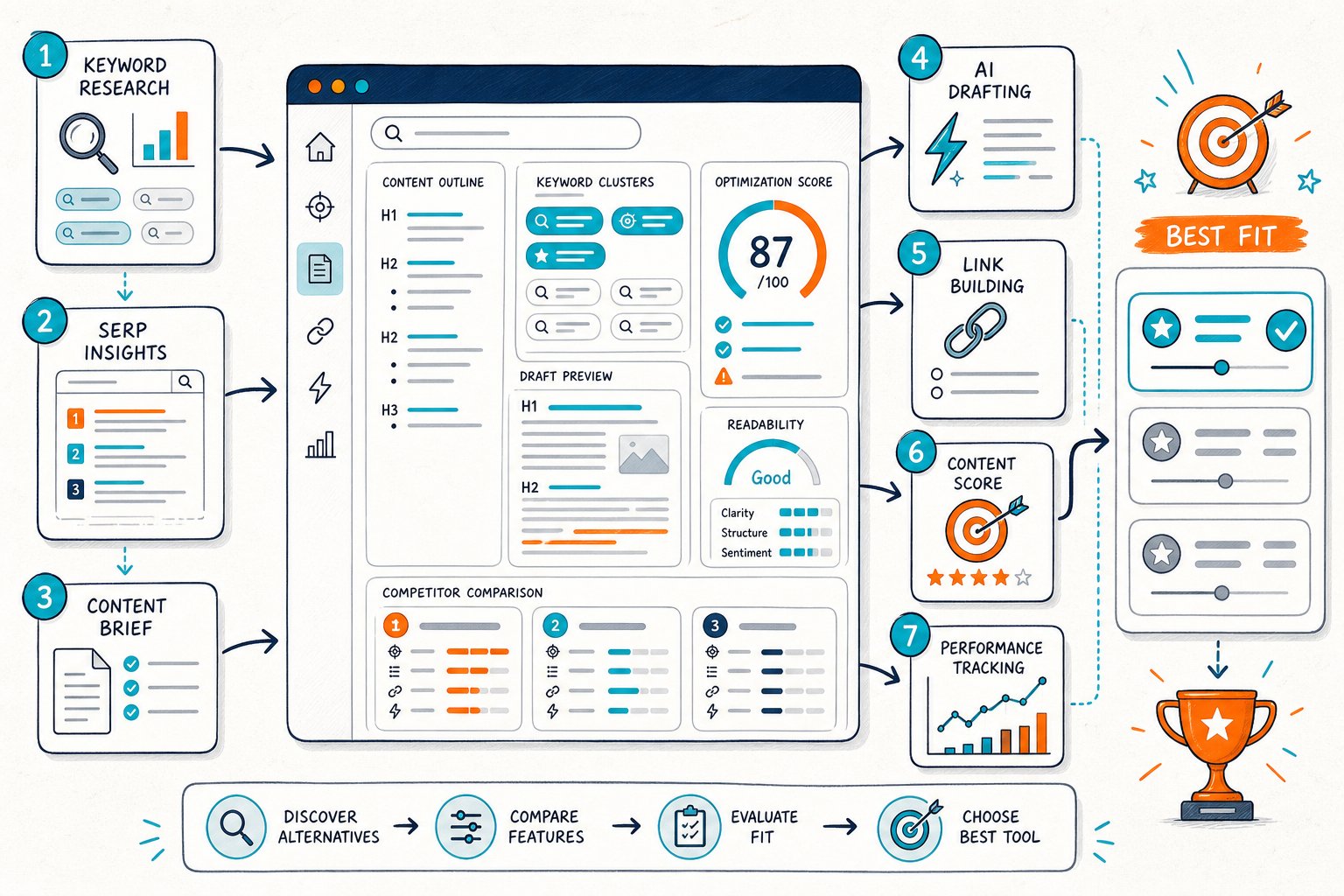
To be fair, no single tool does it all perfectly. The best approach? Start by defining your query and checking your baseline in Search Console.
Inspect the live URL, compare it to a close competitor, make a smart change, and then track clicks, impressions, CTR, and average position over similar periods. That’s how you actually see what moves the needle.
1) Check Page SEO
Best use case: You need to diagnose the exact page you have open in Chrome, whether it’s a staging URL, CMS preview, or a private client page.
Check Page SEO doesn’t just rely on a cloud crawl. It audits the fully rendered page, so you can see metadata, headings, visible content, entities, links, images, schema, canonicals, robots directives, and more, all while you’re looking at the URL.
Use it right after you pick your target query and before you start rewriting. This way, you won’t fall into the classic trap of fixing the H1 and body copy but missing a noindex tag, duplicate canonical, weak internal links, or a section hidden by JavaScript.
You can also stack it up against a competitor’s page and view your Google Search Console data right next to the audit. Treat any SEO score as a helpful nudge, not gospel. Use what you find to make a real change, like adding a missing H2, beefing up a title, or fixing indexability.
2) Surfer SEO
Best use case: You want on-the-fly advice while drafting or updating a content-heavy landing page.
Surfer SEO is all about SERP-driven content editing. Plug in your keyword, check out the top-ranking pages, and get suggestions for terms, word counts, headings, and content scores as you write.
It’s super handy if your page is missing key topics and you want a structured draft. But watch out: those term suggestions can turn into a box-ticking exercise if you’re not careful. Don’t just cram in every phrase; make sure the copy still sounds natural and actually helps your reader.
After you finish writing, double-check the final page in a browser-based auditor. Surfer’s pricing and features can change depending on your plan, so make sure you know your limits before you dive in.
3) Clearscope
Best use case: You run a team of writers and need a straightforward, writer-friendly content optimisation tool.
Clearscope gives you a clean editor, smart term suggestions, readability tips, and a simple letter-grade system. Even writers who aren’t SEO nerds can follow along, which is a lifesaver if you’re managing a bunch of contributors.
It shines when your main headache is keeping content consistent. If you’ve got five writers updating service pages, a shared brief and clear requirements can keep things from getting patchy across your site.
One thing to keep in mind: a great content grade doesn’t mean your canonical is right or your page is actually indexable. Double-check those technical bits after you go live.
Clearscope is often aimed at bigger teams, so peek at the current report and user limits before assuming it’ll save you money in the long run. It’s especially good for semantic grading and editorial workflows, according to third-party comparisons.
4) NeuronWriter
Best use case: You want a budget-friendly content editor with SERP analysis and NLP-style term guidance.
NeuronWriter mixes keyword-focused scoring, competitor review, content planning, and AI writing tools. It’s a solid pick for solo consultants, small agencies, or website owners who want more structure than a blank Google Doc.
Use it during briefing and drafting. Build your outline around real search intent, relevant entities, People Also Ask questions, and what competitors keep including. Then write for actual humans, using the score to spot real gaps, not just to hit a number.
The interface might take a little getting used to, and you’ll want to check what limits come with your plan. Don’t fall into the trap of updating content just to hit frequency targets.
NeuronWriter pitches itself as a lower-cost choice with live scoring and AI workflow features, as they mention in their own comparison.
5) MarketMuse
Best use case: You need to figure out which pages to create, combine, or update across a whole topic cluster.
MarketMuse isn’t about tweaking a single paragraph. It is about planning content depth for your entire site. Use it to find topical gaps, assess what you already have, and pick which pages will actually help your bigger content strategy.
This is especially helpful if your rankings are scattered across a bunch of weak pages. Sometimes you need to merge thin articles and beef up internal links instead of endlessly editing keywords.
Start with MarketMuse to pick the right URL, then run a page-level audit to check content, crawlability, trust signals, and internal links.
Heads up: strategic content tools like this can get pricey or feel overkill if you only have a handful of pages. Always check inventory, query, user, and export limits before you commit. You’ll still need Search Console to see if your updates actually moved the dial.
6) Semrush Content Toolkit
Best use case: You’re already using Semrush for keyword research, competitor analysis, and tracking your rankings.
With Semrush Content Toolkit, you can keep your keyword research, writing tips, and competitor data all in one place. That means less jumping between tools if your whole workflow already lives in Semrush.
Use it early to pick your target query and see what the SERP is rewarding. Don’t just follow the tool. Actually read the top pages. Check for intent, format, repeated entities, commercial hints, FAQs, media, and internal-link patterns.
The catch? Costs can stack up. Some features depend on your subscription tier or add-ons, so check your plan before you assume everything’s included. And don’t chase a generic score if your page serves a different (but still valid) intent than your competitors.
After you publish, use Google Search Console to see if impressions, CTR, and rankings actually budged.
7) Ahrefs Content Helper
Best use case: You already use Ahrefs for keyword difficulty, backlinks, and content gap analysis.
Ahrefs Content Helper is great for turning research into outlines by surfacing themes, questions, and terms around your target keyword. It works best when you pick realistic opportunities, not just high-volume keywords that don’t fit your site.
Start by looking at your page’s current ranking queries. Find queries with solid impressions, positions near page one, or a low CTR that doesn’t match your snippet. Use competitor research to spot missing subtopics that actually belong on your page.
To be fair, it won’t replace a live technical QA. You still need to check the live page for content differences, JavaScript hiccups, redirects, canonicals, robots directives, and schema.
Use Ahrefs to pick your battles and get context. For the nitty-gritty, use a browser audit and Search Console at the URL level.
8) Screaming Frog SEO Spider
Best use case: You need technical crawl data for lots of URLs, not just a single article.
Screaming Frog SEO Spider is still a classic for finding duplicate titles, missing meta descriptions, redirect chains, status code issues, canonicals, hreflang problems, orphaned pages, and internal-link patterns. You can even hook up APIs and do custom extractions if you want to get fancy.
Fire it up when you think your content problem might actually be a site architecture issue. Sometimes, even the best copy can’t shine if internal links are weak, canonicals point elsewhere, or templates create duplicate URLs.
It can’t always see what an authenticated user or a client-side app shows in the browser, so check your rendering settings and crawl access.
Pair Screaming Frog with a live URL check. Crawl for patterns, then inspect your priority page in its real, rendered state before you send anything to your devs.
9) Google Search Console
Best use case: You want the before-and-after data for your optimisation test.
Google Search Console gives you the numbers for your own sites. Check clicks, impressions, CTR, average position, indexed pages, query patterns, and URL trends. It tells you if a page has search demand before you waste time rewriting it.
Filter to the exact URL and compare equal date ranges. Look for high-impression queries where you’re close to page one, queries with a weak CTR, and spots where your title, H1, or content clearly miss the mark.
It won’t explain every ranking jump or drop, though. You’ll still need to check the page, SERP, competitors, and any other site changes.
Don’t compare a random seven-day stretch with a totally different week. Use equal durations and similar days. For low-traffic pages, widen your window so normal swings don’t look like a big win or loss.
10) Google PageSpeed Insights
Best use case: You want to know if page experience issues are putting your content update at risk.
Google PageSpeed Insights gives you both lab and real-world data. Check Core Web Vitals like Largest Contentful Paint, Interaction to Next Paint, and Cumulative Layout Shift, plus common performance tips.
Run it after any big template, image, script, or media changes. Content teams love adding heavy images, chat widgets, videos, tracking tags, and page builders during a refresh. Sometimes that makes your content look deeper, but it can also slow things down for users.
Just remember, performance data alone won’t tell you if your page actually answers search intent or covers the topic well. A fast, thin page is still just thin.
Focus on fixes that help real users. Compress huge images, reserve layout space, cut unused JavaScript, and don’t hide key content behind slow scripts. Then double-check that your main text and H1 are still visible in the rendered page.
How To Choose A Frase Alternative
Start With The Workflow Bottleneck
Pick your tool based on what’s slowing you down most. If writers need better briefs, grab a content editor. If devs need proof for canonicals, schema, redirects, or rendered-DOM issues, go for a live page auditor. If you can’t measure results, start with Search Console.
Separate Content Recommendations From Rendered-Page Checks
A content score can show missing topics, headings, and entities. But it can’t always confirm what visitors or crawlers actually get after templates, JavaScript, consent tools, and CMS rules do their thing. For key URLs, you need both checks.
Confirm Seat, Domain, Credit, And Export Limits
Check your limits, including content reports, domain caps, user seats, AI credits, crawl quotas, API access, and export options. A cheap entry price can sneak up on you once you add writers, clients, or a big content library.
Prioritise Observable Data And Testable Changes
Tackle issues by likely impact, risk, and how easy they are to test. A missing canonical or noindex tag usually matters more than a small wording tweak. Always write a clear hypothesis before editing: “Adding a service-comparison section will better satisfy commercial intent and improve impressions for comparison queries.”
A Page-Level Content Optimisation Workflow
Set The Query Intent And Search Console Baseline
Pick your main query cluster and check the URL’s current clicks, impressions, CTR, position, and ranking queries. Write down the date, page version, title, H1, and any planned changes. Make sure you know if the SERP is informational, commercial, local, navigational, or mixed before you mess with the page format.
Audit Rendered Content, Indexability, And Trust Signals
Open the live URL and look at the rendered DOM. Check your title tags, meta descriptions, H1-H3 structure, visible copy, entities, internal links, canonicals, robots directives, schema, redirects, images, author details, business info, and performance risks.
For pages behind logins or on staging, use a browser-based workflow. Don’t assume an external crawler can see what you see.
Compare One Relevant Competitor Page
Pick a competitor that actually ranks for the same intent, not just whoever’s at the top. Compare their page structure, topic coverage, media, links, commercial signals, readability, trust elements, and missing sections.
Don’t copy their words. Figure out what user need they’re serving better than you, and aim to beat that.
Measure Equivalent Pre- And Post-Change Periods
Roll out one focused group of changes, and don’t forget to mark the date. You’ll want to compare similar stretches of time in Search Console, making sure you’re looking at the same days of the week and giving the page enough time to actually see changes in traffic.
Dig into query-level movement, not just the average numbers for the URL. That’s where the real story hides.
If things don’t go as planned, take a look at the rendered page, check its indexing status, see if there were any shake-ups in the SERPs, and peek at what your competition is doing. For a quick reality check, grab the Check Page SEO Chrome extension and run live URL diagnostics while you troubleshoot.



