
Picking the right Surfer SEO alternative for on-page SEO really depends on the specific URL you’re trying to fix. Sometimes you need a SERP-driven content editor, other times a site crawler, or maybe just a handy browser tool to poke around the page you’re actually looking at, even if it’s a staging or logged-in URL.
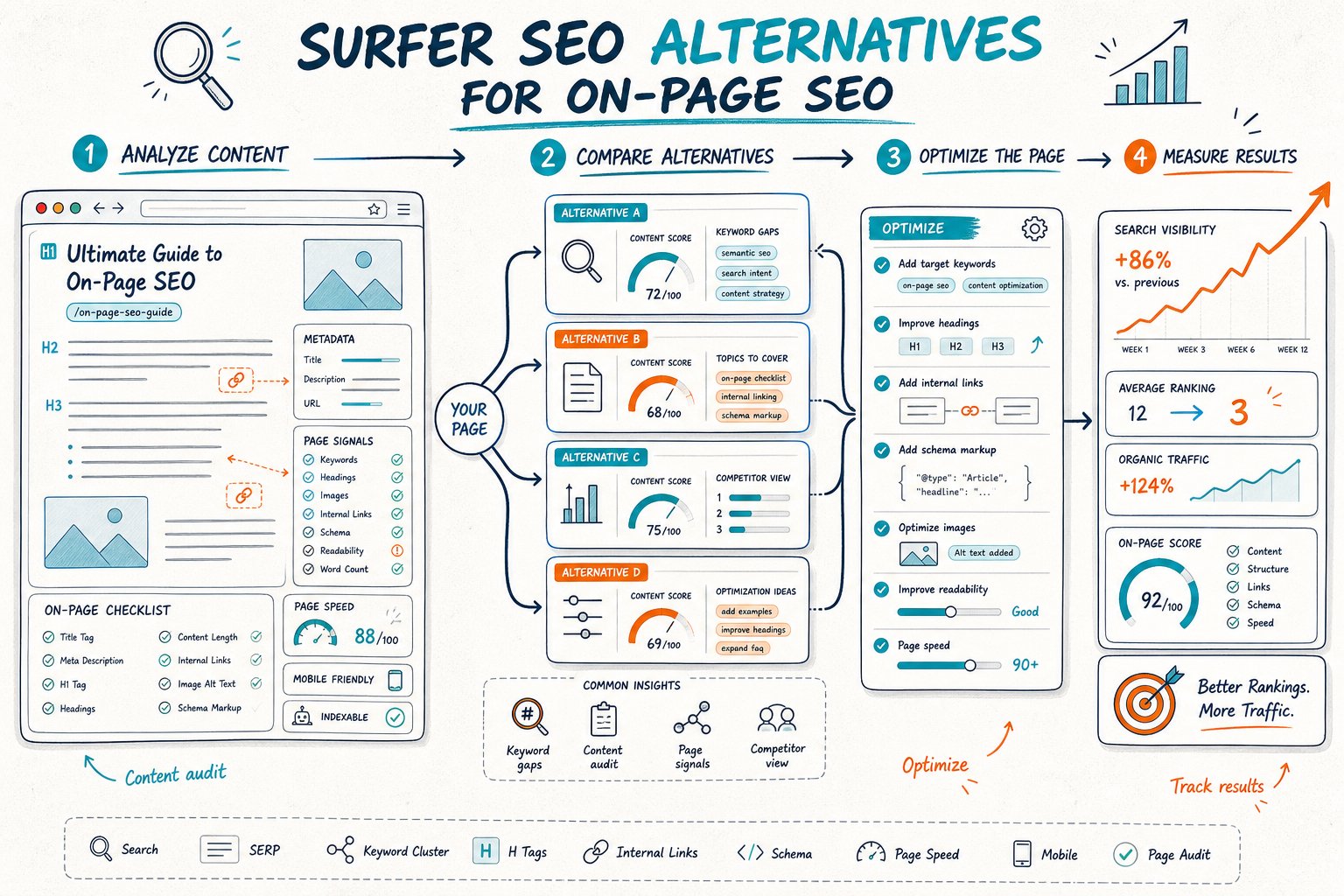
Here’s the strongest play: start with your intent and grab a Google Search Console baseline. Then check how relevant your page looks when rendered, its indexability, trust signals, and where your competitors are pulling ahead.
Take content scores and keyword suggestions as helpful hints, not gospel. The real aim? Make changes you can actually defend, then measure clicks, impressions, CTR, and your position over time.
1) Check Page SEO
Best for: Auditing the live URL in your browser, especially staging, CMS preview, and authenticated pages.
Check Page SEO jumps in early because it lets you inspect the exact page visitors see. You can check title tags, meta descriptions, headings, canonicals, robots directives, schema, links, image alt text, content depth, keyword use, and technical signals, all without sending the URL off to a cloud crawler.
If it’s your own site, you can see Search Console clicks, impressions, CTR, position, and ranking queries right next to your audit. That’s super handy for spotting a page with lots of impressions but a weak title, or one that’s just outside the sweet spot in rankings.
You can even compare your page to a competitor and export everything into reports or AI instructions. The main catch? It’s built for single-page diagnosis, not crawling thousands of URLs at once.
Add Check Page SEO to Chrome for free and give it a whirl next time you’re staring at a page you want to fix.
2) Screaming Frog SEO Spider
Best for: Finding repeatable technical and on-page issues across many URLs.
Screaming Frog is a classic. If you need to crawl a whole site, spot redirect chains, find duplicate titles, check canonicals, hunt down orphaned pages, or audit internal linking, this is your tool. It even renders JavaScript, connects to APIs, and spits out crawl data for your devs.
Use it after you’ve found a problem on one URL and suspect it’s a bigger issue, such as a missing canonical or a noindex tag popping up everywhere. Crawlers are great for uncovering patterns that hit hundreds of pages at once.
But here’s the rub: crawlers don’t show you the page exactly as a user sees it, logged-in or not. And you’ll need to sift through the exports. Do not just blindly fix every warning.
3) Semrush On Page SEO Checker
Best for: Turning keyword targets and competitor benchmarks into optimization ideas.
Semrush On Page SEO Checker shines when you want recommendations based on your target keywords, SERP competitors, backlink ideas, and content gaps. It’s perfect for making a hit list of pages where your titles, headings, or content just aren’t cutting it.
Slot it in after your Search Console review and before you start editing. Look at pages earning impressions, then use its suggestions to see if you’re missing subtopics or entities your rivals are nailing.
Heads up: what you get depends on your Semrush subscription. And always double-check intent. Just because a competitor ranks doesn’t mean their page is the blueprint for yours.
4) Ahrefs Site Audit
Best for: Technical health monitoring, backlink context, and site-wide crawl analysis.
Ahrefs Site Audit is your go-to when you want to see how technical health and backlinks fit into the on-page picture. You’ll spot crawl issues, broken internal links, indexability problems, duplicate content, and pages lacking internal links.
It’s handy when a single URL’s problem might be tied to bigger site issues. Maybe your page has great copy but is buried deep or gets no internal love.
The catch? Crawling isn’t the same as seeing the actual page in your browser. Also, pricing and crawl limits can add up if you’re juggling lots of sites. Use the audit to pick your battles, then always double-check on the live page.
5) SE Ranking On-Page SEO Checker
Best for: Guided page audits tied to a keyword and selected competitors.
SE Ranking’s On-Page SEO Checker gives you a neat breakdown of metadata, content terms, technical stuff, and competitor comparisons. If you’re already using SE Ranking for tracking or reporting, it’s a no-brainer.
It’s great for making sure your page covers the main intent, supporting questions, and headings like your top competitors. Just make sure you’re comparing apples to apples. Do not pit your service page against a giant guide just because they share a keyword.
Plans vary, so check how many audits you get. And if you’re shopping around, here’s a handy comparison of Surfer SEO competitors.
6) Frase
Best for: Creating content briefs and optimizing drafts against SERP topic coverage.
Frase is a lifesaver when you’re stuck turning keyword research into a writer-friendly brief. It pulls in leading pages, common questions, and headings, then suggests topics as you draft or update content.
Use it before you publish or during a big refresh. It’ll help you spot missing sections, weak headings, or unanswered questions that matter to your audience. This is especially clutch for info-heavy pages with clear intent.
Don’t just jam in every recommended term. Write for real people, add proof, and keep your facts straight. Pricing changes, so double-check what you get before you go all-in for high-volume work.
7) NeuronWriter
Best for: Budget-conscious semantic optimization and NLP-led content editing.
NeuronWriter is a solid pick if you like the Surfer SEO style but want to save a few bucks. It lets you analyze competitors, build briefs, track topical terms, and get an optimization score as you write.
It’s best for the drafting stage, after you’ve picked your target query and checked Search Console. NeuronWriter is especially good for finding missing entities and topic clusters when your page ranks but feels a bit thin.
But don’t get too hung up on the score; a high number doesn’t mean you’re nailing search intent. Write for people first. NeuronWriter is a lower-cost option, but check plan limits before you ramp up production.
8) Clearscope
Best for: Editorial teams that need consistent content briefs and quality control.
Clearscope is built for teams who want a repeatable process for topic coverage, recommended terms, readability, and editorial review. It makes it easy to give writers a clear target before anyone starts drafting.
It works best for evergreen pages where multiple folks are involved in briefing, drafting, editing, and approval. The reports help you cover all the right subtopics without turning your copy into a keyword-stuffed mess.
Downside? It’s pricier than some lighter tools, especially if you’re only optimizing a handful of URLs each month. And it won’t catch technical issues. After publishing, still check metadata, canonicals, indexability, internal links, and Core Web Vitals with the right tools.
9) Page Optimizer Pro
Best for: Detailed on-page testing hypotheses for competitive search results.
Page Optimizer Pro (POP, for short) is great if you want nitty-gritty recommendations on page elements, terms, headings, and patterns from top-ranking competitors. It’s a favorite for those who like to test tight hypotheses instead of rewriting everything from scratch.
Use it on pages getting impressions with a stable query target. Maybe you tweak your H1, beef up a section, add entities, or rework your title. Keep changes focused so you can actually tell what moved the needle.
Watch out for mechanical recommendations if your competitor set is unusual. Exclude pages with totally different intent or format. And always check whether your plan has enough reports and credits for your workload.
10) Detailed SEO Extension
Best for: Fast manual inspection of visible SEO elements on public pages.
Detailed SEO Extension is a quick, lightweight browser tool for checking headings, metadata, links, images, canonicals, schema, and page structure as you browse. It’s perfect for fast competitor checks and spot-checking your own work.
Use it when you want a speedy look at a public page. You can see if a competitor uses a certain heading style, FAQ block, or internal-link trick before you add those ideas to your own brief.
It’s not a full workflow tool, so you won’t get Search Console integration, report exports, live scoring, or support for logged-in pages. Think of it as your quick inspection flashlight, not the whole toolbox.
How To Choose A Surfer SEO Alternative
Start With The URL And Search Intent
Begin with a specific URL, target query, and a clear sense of what the page is supposed to do. Figure out if the searcher wants a guide, category page, local service, product, tool, or comparison. Nail your title, H1, and headings to match that intent. Do not sweat term frequency yet.
Pull a Search Console baseline for clicks, impressions, CTR, average position, and query mix. If a page has lots of impressions but low CTR, that’s a different fix than a page with low impressions and thin content.
Separate Rendered-Page Checks From Crawl Data
Use a browser audit for checking the rendered page, visible headings, JavaScript content, authenticated URLs, and staging pages. Use a crawler for template issues, internal links, redirects, duplicate metadata, and indexability patterns across the site.
You really need both. Crawlers can’t see your logged-in state, but browser tools can’t crawl 50,000 URLs.
Match Competitors By Intent, Not Position Alone
Pick competitors solving the same search task, in the same format. If the top URL is a big brand, a forum, a video, or a totally different page type, skip it.
Look at how they use headings, entities, media, links, trust signals, and content depth. Don’t just copy their word count or keyword stuffing. Make sure what you borrow actually helps your readers.
Verify Search Console And Export Requirements
If you manage your own sites, pick tools that connect to Search Console or let you export data easily. You want to tie recommendations to real-world performance, not just a content score.
Agencies, check for PDF, CSV, white-label, and team-sharing options. Also make sure you’ve got the right access controls, report limits, and support for staging or login-protected pages.
Assess Pricing By Audit Volume And Team Workflow
Figure out cost based on your real workload: audits, content reports, crawled URLs, projects, seats, AI credits, and exports. A cheap editor can get pricey if you need hundreds of reports a month.
Don’t forget about implementation time. The best tool is the one that gets you from problem to fix to measurement with the least spreadsheet wrangling.
A Page-Level Optimization Workflow
Capture The Query And Search Console Baseline
Write down your main query, secondary queries, URL, page type, current title, H1, and what you want the page to achieve. In Search Console, export a “before” snapshot with clicks, impressions, CTR, position, and query data.
Mark the date you roll out changes. If your page doesn’t get much traffic, use a longer window to smooth out the daily ups and downs.
Audit Relevance, Crawlability, And Trust Signals
Check the live page for title-to-query alignment, a clear H1, heading coverage, entity depth, internal links, canonical tags, robots directives, structured data, redirects, mobile usability, and Core Web Vitals.
Look for trust signals that fit the page. Maybe that’s an author bio and date for a guide, pricing and product details for a commercial page, or NAP consistency for local service pages.
Prioritize Fixes By Impact, Risk, And Testability
Go for changes with a clear hypothesis and low risk. It’s way easier to test a new title or add a missing H2 than to mess with URL paths or site navigation.
Stick to a simple rule: pick fixes with likely impact, low risk, and easy testability. And don’t lump a dozen big changes together if you actually want to see what worked.
Compare Equivalent Pre- And Post-Change Periods
First things first: give search engines time to recrawl, index, and gather enough data. Don’t jump the gun.
When you’re ready, line up equivalent periods for comparison. Make sure you’re looking at the same number of days and similar weekday patterns. For example, if your traffic tanks on weekends or spikes during the workweek, you’ll want to keep that in mind.
Check out your clicks, impressions, CTR, position, query mix, and conversions. If you see impressions going up but your CTR dropping, it’s time to take a closer look at your title and snippet.
On the flip side, if you’re climbing the rankings but conversions are still snoozing, double-check whether your page matches search intent, offers a smooth experience, and actually guides folks to your main call to action.



