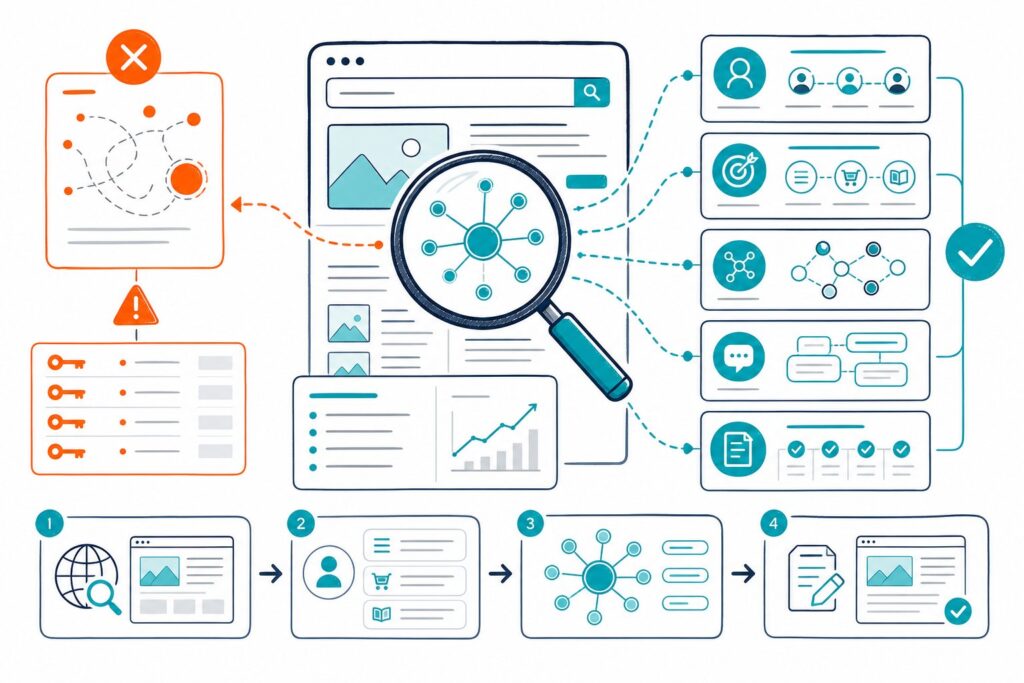
To analyse internal links for SEO, you need to measure where links point, how deep key pages sit, what their anchors say, and whether your strongest pages support pages that need visibility. A clean internal link structure helps search engines discover URLs, understand topical relationships, and guide visitors toward useful next steps.
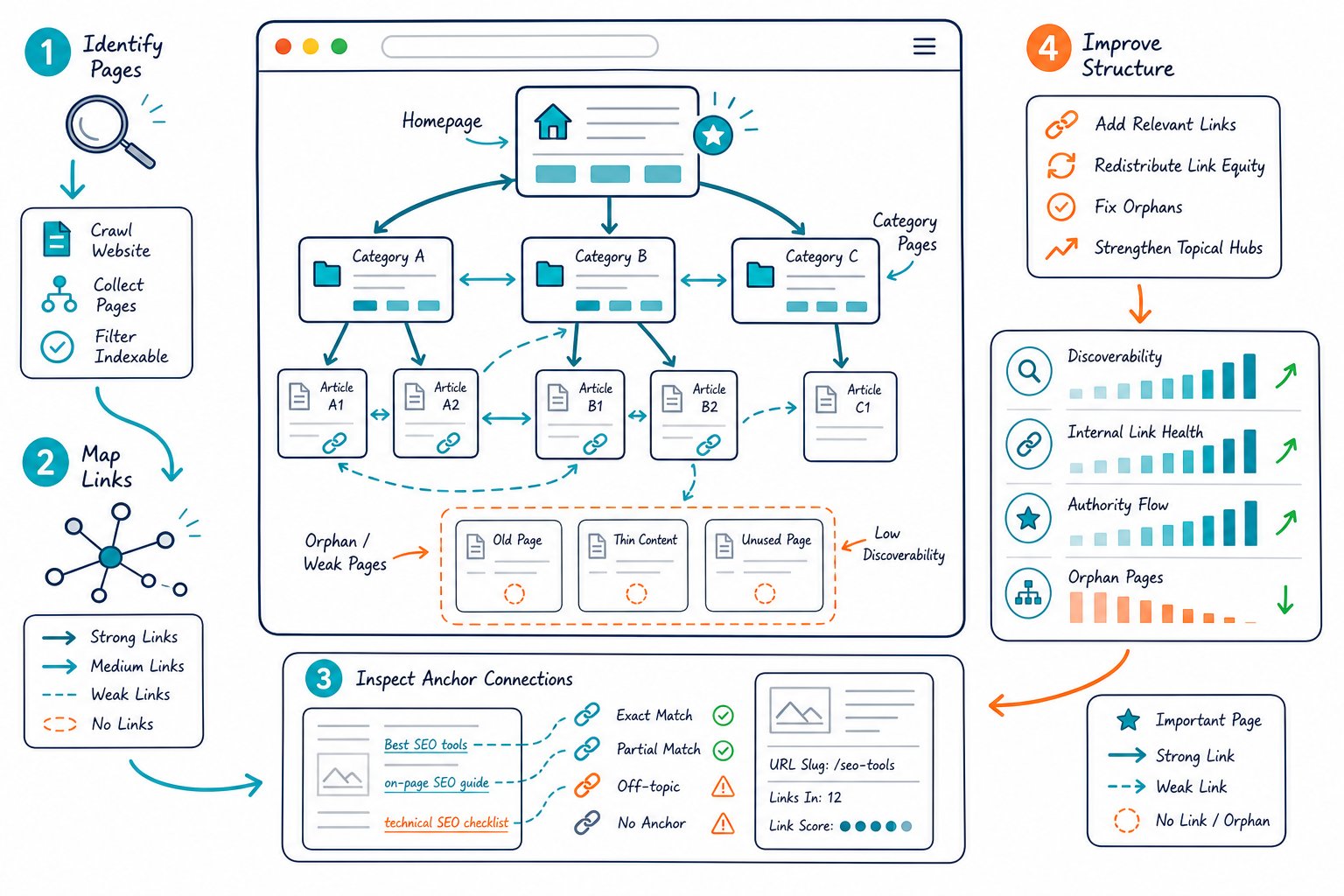
Your goal is to build clear paths from authority pages to important commercial, service, product, and informational pages. You should also remove broken paths, redirect waste, accidental nofollow attributes, and orphaned URLs before they hold back crawlability or organic traffic.
What to Measure Before Changing Your Link Structure
Measure the current link graph before adding links. That way, you can fix the biggest gaps without turning your site architecture into a maze. Focus on internal linking paths, destination-page value, anchor relevance, and link placement.
Which Internal Links Matter Most for Crawlability and Indexing?
Follow links from navigation menus, category hubs, and in-content sections give Google and other search engines useful paths to crawl. A page with no internal links is an orphan page, even if it appears in your XML sitemap.
Check inbound internal links for every indexable URL. Prioritize pages that drive revenue, support core topic clusters, or already show search visibility. Keep key pages reachable through logical navigation and contextual links within a few clicks of the homepage.
Nofollow internal links deserve a manual review. They can make sense for login, account, or low-value utility URLs, but important content and landing pages should receive standard follow links.
How Do Anchor Text and Surrounding Context Define Relevance?
Your internal anchor text tells users and crawlers what the destination page covers. Use descriptive wording that matches the linked page’s topic, such as “technical SEO audit checklist” or “local keyword research process.”
Exact-match anchor text has a place when it sounds natural. Repeating the same keyword-heavy anchor across dozens of pages creates a thin, predictable pattern and gives readers less useful context. Vary anchors by reflecting the page’s real subtopics, intent, and benefit.
Review the sentence and heading around every important contextual link. A link placed under a relevant H2 and inside supporting copy sends a clearer topical signal than a generic “learn more” link.
Which Pages Should Receive More Internal Link Equity?
Send more internal link equity to pages with business value and realistic ranking potential. These often include pages with strong backlinks, high impressions, positions near page one, or clear conversion intent.
Use your domain authority checker alongside backlink analytics to identify authority pages. Then link from those pages to relevant URLs that need support. Keep the connection useful for readers, such as linking a guide from a high-traffic blog post to a related service page.
Avoid pushing every page from every authority page. Relevance and topical fit should call the shots.
How Do Navigation, Footer, and In-Content Links Differ?
Navigation links define your main site structure and help visitors reach major sections. Footer links support essential pages, legal pages, contact paths, and broad category access. Sidebar links work well for closely related resources, as long as the layout stays easy to scan.
In-content links carry the strongest editorial meaning because they sit inside relevant copy. Image links also count as internal links, and the image alt text should describe the destination or image purpose when the image functions as a link.
Audit each type separately. A site with hundreds of footer links and only a handful of content links often has weak topical pathways between related pages.
Internal Link Audit Workflow and Priority Fixes
A useful internal link audit turns crawl data into a ranked fix list: repair technical failures first, strengthen important pages next, then improve your topic-cluster paths. Keep a before-and-after record so you can validate indexing and performance changes.
How to Find Orphaned Pages, Broken Links, and Redirect Chains
Start with a full site audit using Screaming Frog, Ahrefs Site Audit, Semrush Site Audit, or your preferred crawler. Export all crawlable URLs, internal links, status codes, canonical targets, and nofollow attributes.
Compare crawled URLs against your XML sitemap, Google Search Console indexed-page data, CMS exports, and Analytics landing pages. URLs found in the sitemap or Search Console but absent from the crawl are likely orphaned pages.
Fix issues in this order:
- Broken internal links returning 404 errors.
- Internal links pointing through redirect chains.
- HTTP links that should point directly to HTTPS URLs.
- Important pages with no inbound internal links.
- Links to canonicalized, noindex, or redirected destinations.
Update internal links to the final 200-status URL. Each direct link improves crawl efficiency and cuts unnecessary hops for search engine crawlers and AI crawlers.
How to Review Crawl Depth and Homepage Paths
Review crawl depth for pages you want indexed and ranked. Pages buried deep in the site structure have fewer discovery paths and tend to receive less practical attention from users.
Count the shortest click path from the homepage through navigation, hubs, and content links. Important category pages, pillar pages, and conversion pages should have clear routes. Deep pages can earn stronger paths through related cluster pages or carefully chosen hub links.
Don’t flatten every site into one giant navigation menu. Give visitors focused paths based on topic and intent. You can review live navigation links, page links, broken targets, and follow status with Check Page SEO while viewing the page in Chrome.
How to Map Pillar Pages, Cluster Pages, and Topic Clusters
Map one pillar page to a defined topic, then list the cluster pages that answer narrower questions. Each cluster page should link back to its pillar page when the relationship is useful, while the pillar page should link to its best supporting content.
Bidirectional links help create a readable structure for visitors and crawlers alike. For example, a pillar page about content optimization can link to pages about finding missing content topics, readability, keyword coverage, and updating existing pages.
A silo structure works when it reflects real topical relevance. Cross-link between silos only when the reader gains useful context, such as connecting technical SEO guidance to a page-speed resource.
How to Prioritize Links Using Search Console and Backlink Data
Use Google Search Console to find pages with high impressions, low click-through rate, and average positions close to stronger rankings. These URLs are strong candidates for relevant internal links from authority pages.
Prioritize pages using four signals:
- High impressions with positions outside the top 10.
- Valuable pages with few internal inbound links.
- URLs with strong backlinks or referring domains that can pass internal equity.
- Cluster pages that support a revenue-focused pillar page.
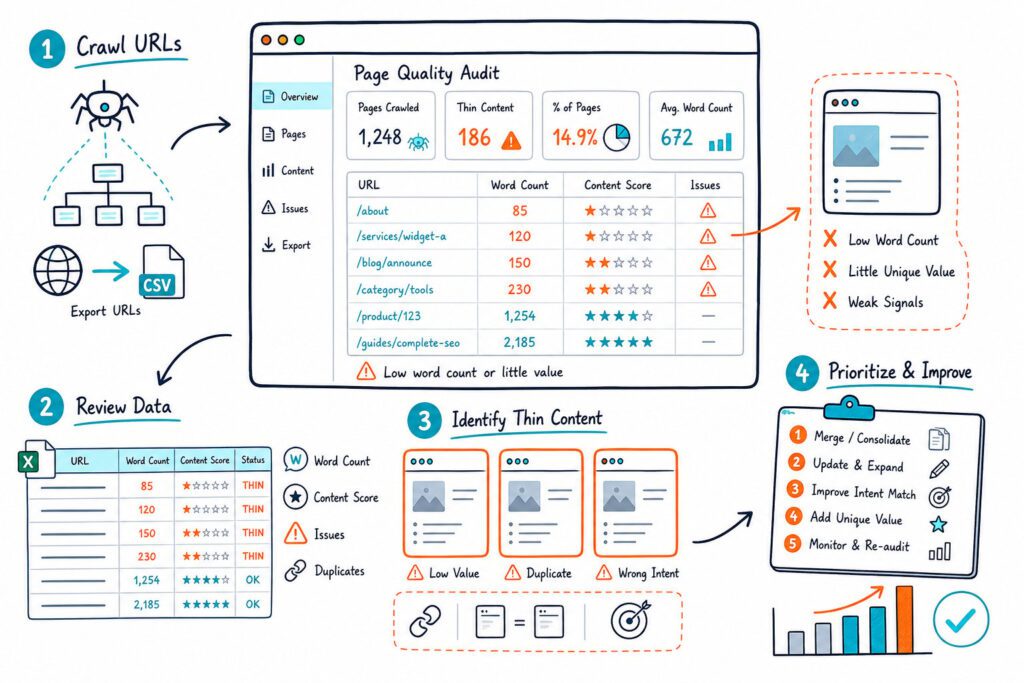
Review page intent before linking. A blog post should link to a commercial page only when the reader would reasonably want the next step. For content pages that lack depth, use a practical thin-content audit before adding more links to weak copy.
How to Validate Fixes on Live Pages and Track Results
Validate every fix on the live page after deployment. Confirm that the link points to the intended HTTPS destination, returns a 200 status, uses useful anchor text, and appears in rendered HTML where Google crawlers can access it.
Submit key updated URLs for indexing in Google Search Console when a change affects important pages. Record the deployment date, the URLs changed, the links added or removed, and the target queries.
Give the changes enough time for recrawling and data collection. Compare equal date ranges in Search Console, then review impressions, clicks, CTR, average position, time on site, bounce rate, and conversions.
For page-level checks and execution-ready reports, install our live on-page SEO auditor and verify each internal link where it appears.