Refreshing existing pages with Google Search Console gives you a practical way to recover organic traffic, lift click-through rates, and build on rankings your site has already earned. You can use GSC to find pages with proven impressions, diagnose the search queries behind them, make focused updates, and measure whether those changes improve content performance.
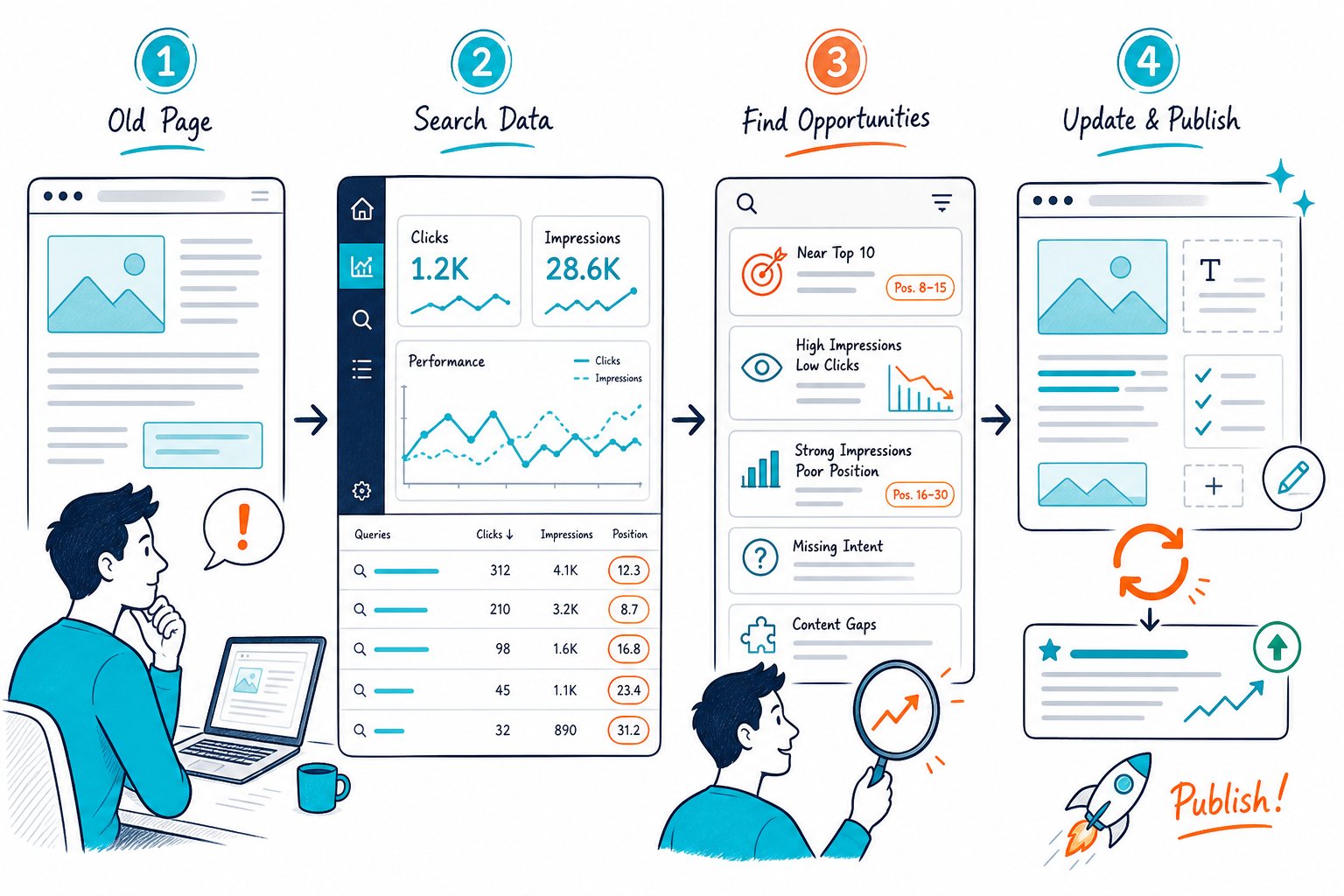
When you’re figuring out how to refresh existing content using Google Search Console, start with performance trends before editing a single word. A content refresh SEO workflow works best when the update solves a visible problem: falling clicks, poor CTR, keyword drift, weak page structure, or outdated information.
Find and Prioritize Refresh Opportunities in GSC
Your best refresh opportunities already earn impressions because Google has enough evidence to test them in search results. Use GSC to build a shortlist based on traffic decline, ranking proximity, click-through rate, and business value.
Export page and query data into a spreadsheet, then group URLs by page type and topic. A rank tracker, Semrush, or Ahrefs can add competitor context, while GSC remains your first-party record of clicks, impressions, CTR, average position, and search queries.
Set a Baseline With Clicks, Impressions, CTR, and Average Position
Open the Performance report, select a meaningful date range, and compare it with the previous equivalent period. Record total clicks, impressions, click-through rate, and average position for each important URL.
Use equal periods with matching days of the week. If you publish an update on a Tuesday, compare post-update data with a prior period that includes the same weekday mix. That way, normal weekend traffic changes don’t masquerade as content performance gains.
Track these fields in your spreadsheet:
- URL
- Monthly traffic and total clicks
- Impressions
- CTR
- Average position
- Primary keyword
- Update date
- Refresh action taken
Find Pages With Declining Clicks Before Content Decay Deepens
Filter the Pages tab for URLs with declining clicks across the last three to six months. Content decay often appears first as reduced impressions, followed by lower clicks as competing pages become fresher or better aligned with user intent.
Check whether the drop affects one page, a topic cluster, or your whole site. A page-level decline points toward a refresh, while a wider decline may reveal internal linking gaps, stale templates, site quality issues, or a shift in search demand.
Prioritize pages that once performed well. Existing rankings, backlinks, and internal links give you a much stronger starting point than a brand-new URL.
Prioritize High-Impression Pages With Low CTR
High impressions with low CTR point to a snippet problem when your average position is already competitive. Review the title tag, visible SERP competitors, and meta description before planning a full content rewrite.
Compare the page title with the queries driving impressions. If people search “best project management software for agencies” and your title says “Project Management Guide,” you’ve got a relevance gap before the click.
Use GSC data alongside an AI prompt for rewriting meta descriptions when you need several controlled snippet variations. Keep the promise precise, include the main topic, and make sure it matches the page’s actual content.
Identify Striking-Distance Keywords and Underperforming Pages
Look for keywords with average positions near page one, especially queries ranking from positions 8 through 20. These striking-distance terms show that Google already connects your page with the topic.
Open the query, inspect the ranking page, and decide whether the term belongs on that URL. Add relevant secondary keywords to supporting headings, examples, image alt text, and body copy when they make the answer more useful.
Don’t force unrelated keywords onto a page. If a query has distinct user intent, build a separate page and connect it with a descriptive internal link. Use a practical guide to finding missing topics in content to tell a genuine content gap from an entirely new topic.
Use the Queries Tab to Detect Keyword Drift and Secondary Keywords
The Queries tab shows how Google reads your page today, which may be different from your original keyword plan. Sort by impressions, then identify terms that have grown, declined, or appeared since your last update.
Keyword drift can be useful when the new queries fit the page’s purpose. A guide that starts earning impressions for “template,” “checklist,” or “pricing” queries may need a downloadable template, a clearer checklist, or a pricing section.
Review phrase patterns rather than isolated keywords. Check Page SEO’s live analysis to assess heading coverage, semantic phrases, keyword density, and thin sections while you review the page itself.
Diagnose, Update, and Validate Each Page
A successful refresh matches the page to current search intent and improves the user’s path from search result to answer. Every edit should have a clear reason tied to GSC data, the current SERP, and content quality.
Check the live page before editing. Review the title, headings, visible copy, internal links, backlinks, schema, indexability, page speed signals, and content depth so you fix the real constraint instead of polishing the wrong thing.
Match the Refresh to Search Intent and the Current SERP
Search intent changes as Google Search learns what users select and engage with. Review the current SERP for your main query and note the dominant format: guide, product page, category page, calculator, comparison, local result, or video-led result.
Match your page format to that result set. If ranking pages answer “how to” queries with steps, screenshots, and examples, build those elements into your own page. If AI Overviews appear, make the opening answer direct and specific, then support it with useful detail farther down the page.
Don’t copy competitor wording. Use competitor structure to spot missing sections, then add your own experience, evidence, and clearer explanations. A competitor heading and metadata audit can help you find structural gaps quickly.
When to Improve Titles and Meta Descriptions Instead of Rewriting Content
Update titles and meta descriptions when impressions are strong, average position is stable, and CTR is weak. This is a lower-risk change because your page content and URL stay intact.
Write a title that reflects the query language, page type, and current benefit. Keep the meta description focused on the task the searcher wants to complete. Avoid promising data, tools, prices, or steps the page doesn’t actually provide.
A full content rewrite makes more sense for pages with poor rankings, outdated information, weak engagement, or a major intent mismatch. If your page already answers the query well, start with metadata and measure the result before changing the body.
Close Content Gaps With Better Structure, Evidence, and Internal Links
Expand weak sections when your query data reveals missing questions or secondary keywords. Add descriptive H2s, concise answers, first-hand examples, current screenshots, dates, tables, or supporting evidence wherever users need them.
Audit your content for readability before adding more words. Long blocks, vague subheadings, and repeated phrases hurt scannability even when the page has a high word count. Use a content readability SEO test to find dense sections that need cleaner formatting.
Add internal links from related pages with descriptive anchor text. Internal links help visitors reach the next useful page and clarify the relationship between pages for search engines.
Decide Whether to Refresh, Consolidate, Redirect, or Remove a URL
Refresh a URL when it has relevant impressions, useful backlinks, and a clear role in your content marketing plan. Keep the same URL when the topic remains valid, since its existing signals and links stay attached to the page.
Consolidate URLs when two or more pages compete for the same intent. Choose the stronger page, merge useful content, add a permanent redirect from the weaker URL, and update internal links to point to the destination.
Remove a URL when it has no strategic purpose, no useful links, no traffic, and no replacement value. For stale snippets on pages you don’t control, Google provides a Refresh Outdated Content tool for changed or removed content.
Request Indexing and Measure the Outcome Without Misreading the Data
After publishing, inspect the updated URL in GSC and request indexing. Confirm that the page is indexable, the canonical points to the intended URL, and the visible page includes your changes.
Wait for Google to re-crawl, then collect enough data to compare equal time periods. High-traffic pages can show useful signals within a few weeks, while low-volume pages need a longer measurement window.
Use GSC for clicks, impressions, CTR, and average position. Use Google Analytics for engagement, bounce rate patterns, conversions, and assisted actions. Record every change in your spreadsheet so you can tell whether title edits, content updates, internal links, or a SERP shift drove the result.
For faster page checks before and after publication, Add to Chrome for free and audit the live URL alongside your Search Console data.