Google Search Console gives you one of the fastest routes to SEO opportunities because it shows where Google already gives your pages visibility. You can find SEO opportunities in Google Search Console by isolating pages and queries with strong impressions, weak CTR, near-page-one average positions, or declining performance, then matching each signal to a focused fix.
Your Search Console data becomes genuinely useful when it drives a clear workflow: improve a page that already earns impressions, protect a page losing organic growth, or build content around proven demand. Start with evidence from your own Google Search results, then use page-level auditing to turn that finding into an action.
Read Performance Data Before Choosing a Fix
Your Performance report shows where visibility exists and where qualified clicks are slipping away. Read the metrics in context before editing titles, expanding content, or changing technical SEO elements.
Set a Comparable Date Range and Segment the Report
Use two equal date ranges and align the days of the week. A 28-day comparison against the prior 28 days works well for steady sites, while seasonal businesses should use year-over-year comparisons too.
The default Search results report shows the past three months, and you can change its metrics, dimensions, and date range through the Performance report settings. Segment by country, device, search appearance, page group, and branded searches before drawing conclusions.
Use regex filters when your site has large query sets. For example, filter informational terms such as how|what|why|guide or commercial modifiers such as pricing|software|service|buy.
What Impressions, Clicks, CTR, and Average Position Really Show
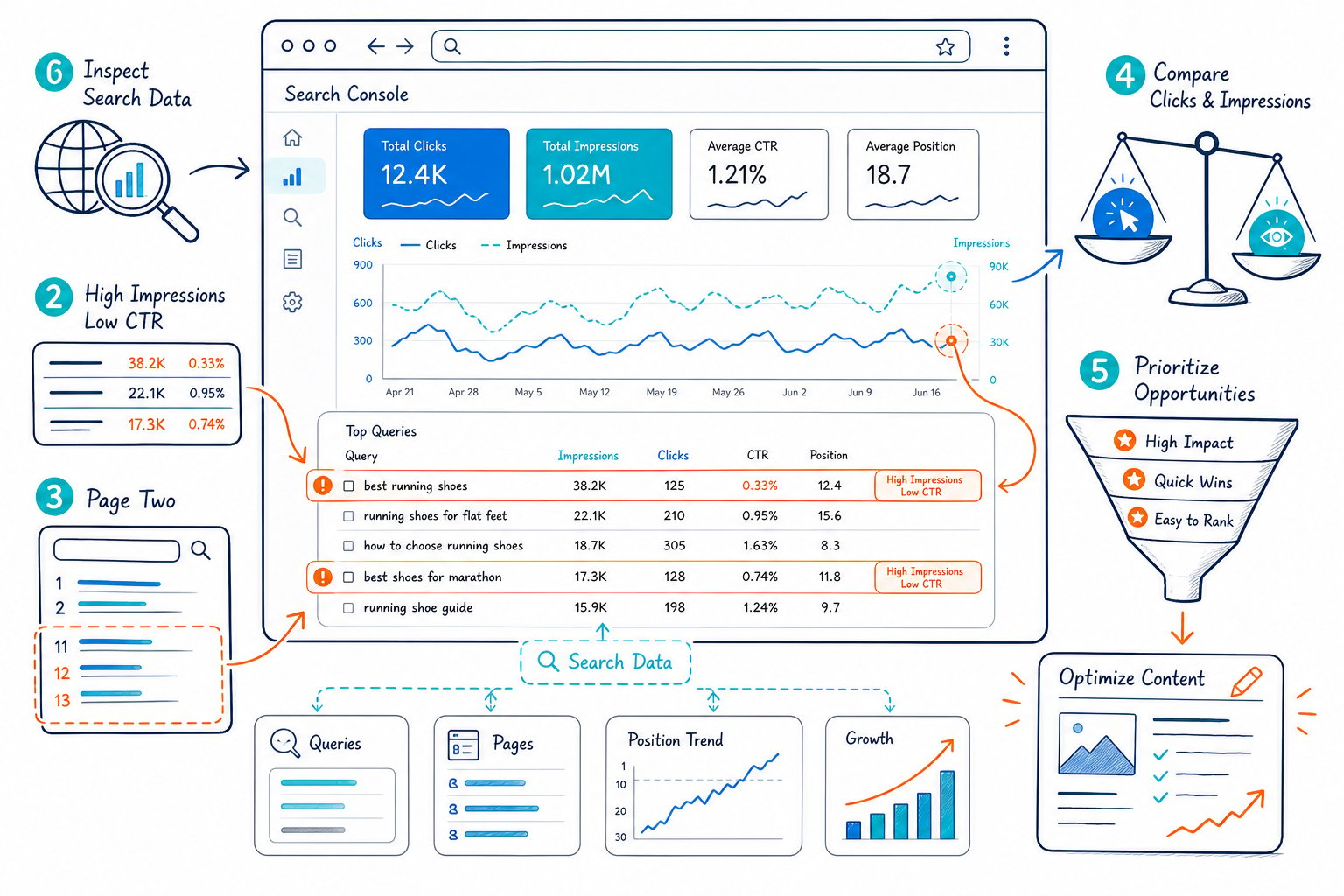
Impressions show search demand and exposure. Clicks show visits from Google Search. CTR, or click-through rate, shows how often an impression became a click. Average position is a useful directional metric, though it combines many rankings across queries, devices, and SERP layouts.
A low CTR with an average position of 2 needs a different review from low CTR at position 12. The first often points to title relevance, meta description quality, search appearance, or crowded SERP features. The second usually needs stronger relevance, deeper content, internal links, or backlinks.
Compare page-level average CTR with query-level CTR. A page can look healthy until one high-impression search query reveals weak click performance.
Start With Pages, Then Validate the Search Queries
Start with page data because pages are the things you will edit. Sort pages by impressions, clicks, or click change, then open one URL and switch to the Queries tab.
This sequence prevents a common mistake: optimizing a query that really belongs to a different page. It also exposes keyword cannibalization when multiple URLs receive impressions for the same search intent.
For a faster review, connect Search Console to Check Page SEO and view clicks, impressions, CTR, average position, and ranking queries beside the live page you are auditing.
Filter Near-Ranking Queries and High-Impression Low-CTR Pages
Filter for queries sitting near page one, then inspect the page that ranks. Positions 8 through 20 are useful candidates when the query fits your offer and the page already meets the basic search intent.
High-impression, low-CTR pages are another priority group. Review these pages when their rankings are already competitive, especially if the title tag is vague, outdated, or poorly aligned with the query language.
Avoid setting a universal CTR target. Average CTR changes sharply by position, device, brand recognition, and SERP layout. Focus on pages where CTR has dropped against a comparable period while impressions and position remain stable.
Account for Search Appearance, SERP Features, and AI Overview
Search appearance changes the meaning of the data. Product rich results, video results, featured snippets, image packs, local packs, and AI Overview placements all change the amount of click space available.
Check the Search Appearance dimension before treating a CTR decline as a copy problem. If an AI Overview or featured snippet takes up more of the results page, your visibility may hold while clicks fall.
Track the trend by query group and page. A sudden change across related queries often reflects a SERP shift, while a decline isolated to one URL points more directly to page quality, relevance, or technical issues.
Turn Search Signals Into Prioritized SEO Work
The strongest SEO strategy turns each Search Console signal into one specific task with a clear expected outcome. Prioritize work where intent fits your conversion path, the page has meaningful search demand, and the fix is realistic.
When to Rewrite a Title Tag and Meta Description
Rewrite a title tag when impressions are strong, rankings are stable, and CTR trails comparable queries or pages. Put the core query and user benefit early, then make the wording specific to the page’s purpose.
Use meta descriptions to reinforce the promise and set expectations. They do not guarantee the displayed snippet, since Google frequently rewrites snippets, but strong descriptions still give you more control over the message.
Do not change title tags on pages with falling rankings until you assess search intent and competitor changes. A title test works best when page relevance is already sound.
When Content Depth and Headings Need Expansion
Expand content when query data shows your page appearing for topics it only answers briefly. Review the headings of pages that rank above you, then identify missing questions, entities, examples, comparison points, or decision details.
Add sections that serve a proven sub-intent. A long page with repeated keyword use does not solve a coverage gap. Use a content gap review for missing topics to identify themes before drafting.
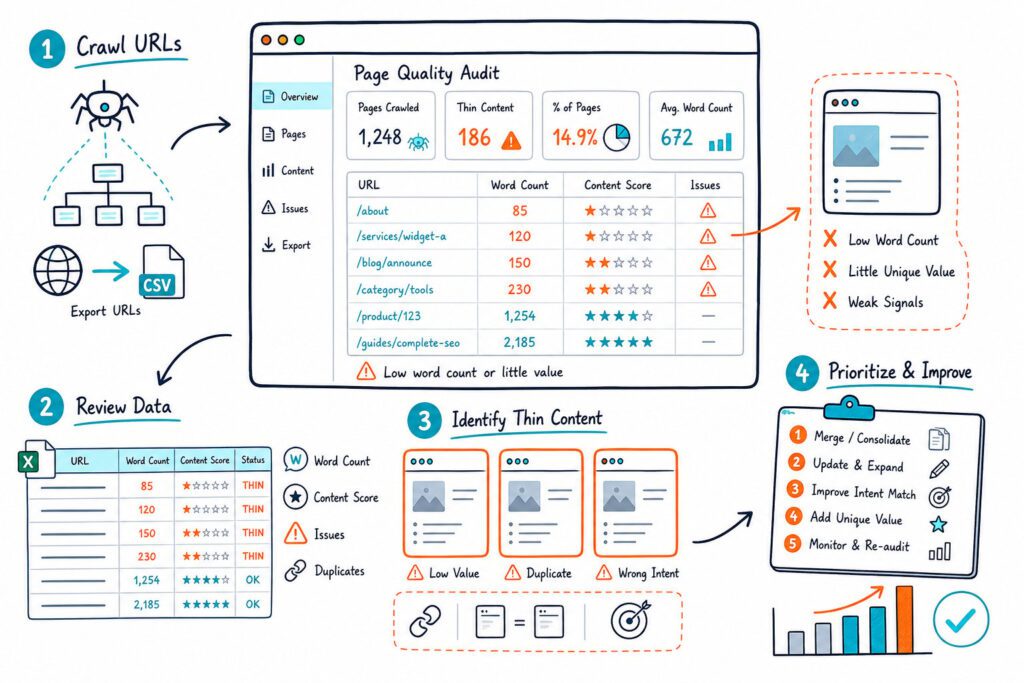
Check whether each H2 has useful supporting text. Thin headings with one vague sentence create a weak experience and make the page harder to scan. Review your website word count for SEO alongside intent, not as a target by itself.
How to Find Internal Linking Opportunities
Find internal linking opportunities by locating pages with impressions for related terms that lack links from stronger, relevant pages. Link from a page that already discusses the topic naturally, and use descriptive anchor text.
Match the anchor text to the destination’s purpose. A link labeled “technical SEO audit checklist” gives clearer context than “learn more.”
Audit underperforming pages for orphaned or weakly linked URLs. Then add internal links from category pages, related guides, high-traffic articles, and relevant commercial pages. Internal linking helps Google discover relationships between supporting content and priority URLs.
How to Diagnose Pages Losing Visibility
A page losing visibility needs a timeline before you choose a fix. Compare clicks, impressions, CTR, and average position over equal periods, then identify whether the decline affects one query group, one device type, or all traffic.
Declining impressions with stable average position can signal reduced search demand or seasonality. Falling position across several important queries points toward relevance, competitor improvements, quality issues, or lost backlinks.
Check page changes, publishing dates, redirects, canonicals, and index status. Pair Search Console with Google Analytics when you need to separate search visibility loss from conversion or engagement changes. Google provides guidance for comparing Search Console and Google Analytics data.
Refresh, Consolidate, or Create Supporting Content?
Refresh a page when its core intent remains valid and its rankings show residual relevance. Update outdated facts, improve headings, add missing evidence, and strengthen the conversion path.
Consolidate pages when two or more URLs compete for the same intent and split impressions. Choose the strongest URL, merge unique value, redirect carefully where appropriate, and update internal links.
Create supporting content when search queries reveal a distinct intent that your existing page cannot serve well. Use competitor heading and meta tag checks to map structural gaps before committing to a new page.
Check Indexing and Technical Constraints Before Editing
Check indexing before investing in content updates. Use the URL Inspection tool to verify whether Google indexed the selected canonical URL and whether crawling or indexing problems are blocking visibility.
The URL Inspection tool checks one URL at a time, while the API supports up to 2,000 URL inspections per day, as described in this URL inspection overview. Review duplicate content signals, canonical tags, robots directives, mobile usability, Core Web Vitals, rich results, and server response issues.
A page that is excluded, redirected, blocked, or canonicalized elsewhere will not benefit from a title rewrite. Resolve the technical constraint first, then request indexing after a meaningful update.
Prioritize Opportunities by Intent, Effort, and Business Relevance
Score each opportunity using intent fit, current visibility, expected impact, effort, and business relevance. A query with 200 impressions and strong purchase intent may deserve more attention than a broad query with far more impressions and weak conversion potential.
Use four practical labels:
- CTR opportunity: Strong rankings and impressions, weak click-through rate.
- Near-ranking opportunity: Relevant query positions near page one.
- Content opportunity: Search queries expose missing coverage or weak content quality.
- Technical opportunity: Indexing, crawling, mobile, or rich-result issues limit performance.
Use traditional keyword research after Search Console review, not before it. Your own query data shows the language Google already associates with your pages; external keyword research expands the content planning horizon.
Measure Ranking Improvements Without Misreading the Data
Measure ranking improvements using equal date ranges, the same device and country filters, and a documented implementation date. Search Console provides up to 16 months of historical Search results data, so you have enough room to compare seasonality and spot longer-term performance trends.
Track clicks, impressions, CTR, average position, and conversions for the edited URL. Record the primary query group separately from branded searches, since brand growth can easily hide weak non-branded performance.
Wait long enough for the page’s traffic level. High-traffic URLs may show a meaningful pattern in two to six weeks, while lower-volume pages need a longer window.
For faster execution, install our live on-page SEO auditor and turn each Search Console finding into a page audit, competitor comparison, or AI-ready task prompt.