
ChatGPT shines for on-page SEO if you feed it the right evidence, set a clear job, and lay down some ground rules. It can seriously speed up audits, content briefs, metadata, internal linking, and QA.
Just a heads up, though: ChatGPT can’t magically inspect a live URL or poke around your Search Console unless you hand over the data yourself.
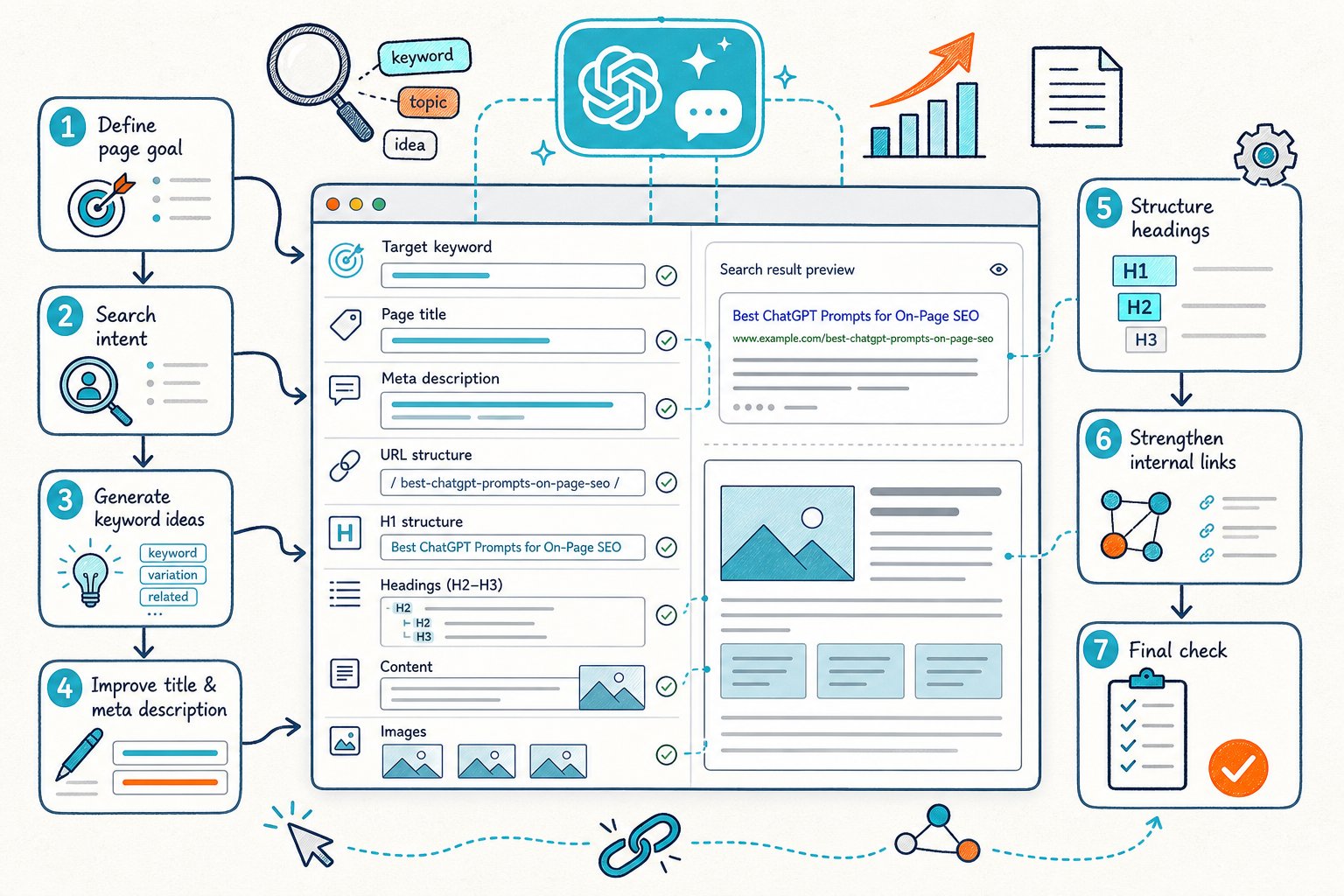
Start with intent and a performance baseline. Check the rendered page and technical signals, size up a competitor, then test your changes.
The prompts below fit that workflow. No keyword-stuffing copy generators here.
1) Live URL On-Page Audit Triage Prompt
Primary use: Turn a live-page audit into an ordered task list.
Paste in the rendered copy, HTML findings, page type, target query, and any known issues. Don’t just tell ChatGPT to “audit this URL” unless you’ve supplied the goods.
Act as a senior technical SEO. Diagnose this specific page for the target query: [QUERY].
Page type: [BLOG/LOCAL SERVICE/PRODUCT/SAAS].
Rendered-page findings: [PASTE FINDINGS].
Visible copy: [PASTE COPY].Return a triage table with: issue, evidence, likely SEO impact, implementation risk, owner, and validation method. Prioritize crawlability, indexability, intent mismatch, weak title/H1 alignment, heading gaps, thin sections, internal links, trust signals, and UX issues. Flag any conclusion that lacks evidence. Do not invent page data or ranking factors.
Always run a live browser audit first. Tools like Check Page SEO let you inspect the real, active URL, even for staging or logged-in pages.
Limitation: ChatGPT is great at organizing evidence but can’t swear that any finding moves your rankings. Treat its output like a hypothesis list, not gospel.
2) Search Intent And SERP Fit Prompt
Primary use: See if your page format actually answers the query better than your top competitor.
Evaluate whether this page matches the likely search intent for [QUERY].
Target audience: [AUDIENCE].
Our page type and goal: [PAGE TYPE/CONVERSION GOAL].
Top-ranking competitor page notes: [PASTE HEADINGS, FORMAT, FEATURES, AND CONTENT TYPES].
Our page copy and heading outline: [PASTE].Classify the dominant intent as informational, commercial investigation, transactional, navigational, local, or mixed. Identify intent elements our page misses. Recommend only changes that improve task completion, clarity, and relevance. Separate must-have content from optional differentiators.
Do this before you start rewriting. Even a gorgeous page can flop if Google is showing price lists, comparisons, or step-by-step guides instead.
Limitation: SERPs can have mixed intent. Don’t force your page into a competitor’s mold if your business model or conversion path is different.
3) Title Tag And Meta Description Rewrite Prompt
Primary use: Generate testable title and meta description pairs that actually match the query and page promise.
Create 5 title tag and meta description pairs for this page.
Primary query: [QUERY].
Secondary queries: [QUERIES].
Current title: [TITLE].
Current meta description: [DESCRIPTION].
Page purpose: [PURPOSE].
Audience: [AUDIENCE].
Proof points available on the page: [FACTS ONLY].Keep titles specific, readable, and aligned with the page content. Keep descriptions accurate and action-oriented. Do not add claims, prices, awards, dates, or features not supported by the supplied page evidence. For each option, explain the search intent angle and potential CTR benefit.
Title tags are still powerful for relevance and clicks, even if Google sometimes rewrites them. Always check the H1, visible page promise, and title together before hitting publish.
A practical guide to SEO prompts also recommends using prompts for specific tasks, not just vague requests.
Limitation: Chasing higher CTR is good, but don’t get sneaky. Misleading titles mean bad visits and weak conversions.
4) H1, H2, And H3 Information Architecture Prompt
Primary use: Fix a page structure that’s tough to scan or misses key subtopics.
Rebuild the heading architecture for this page.
Target query: [QUERY].
Search intent: [INTENT].
Existing headings: [PASTE H1-H3].
Visible copy: [PASTE].
Required topics: [LIST].
Topics already covered by competitors: [LIST].Return one H1, a logical H2/H3 hierarchy, and a short purpose statement for each heading. Preserve accurate existing material where possible. Identify headings that should be merged, removed, or expanded. Do not create FAQ headings unless they answer real user questions and add unique value.
A good outline does more than sprinkle in keywords. Each section should do a job: explain, compare, prove, guide, or help the reader take action.
Limitation: Changing headings alone won’t make thin content robust. Each H2 needs real substance, not just a fancy label.
5) Competitor Content Gap Analysis Prompt
Primary use: Find real coverage gaps without just parroting the competition.
Compare our page against this selected competitor.
Target query: [QUERY].
Our page headings and copy: [PASTE].
Competitor headings, copy notes, media, links, and page features: [PASTE].Identify content gaps in a table: missing topic, evidence from competitor, user need addressed, recommended action, effort, and risk of creating duplicate or unnecessary content. Distinguish between table-stakes topics, useful differentiators, and competitor-specific material we should not copy. Recommend original examples, proof, tools, visuals, or first-hand detail where appropriate.
Run this after you’re sure the competitor is targeting the same intent. Sometimes, pages rank for similar terms but serve totally different audiences.
Limitation: Don’t obsess over word count or keyword frequency. Look for missing decisions, questions, examples, and proof.
Side-by-side comparisons can be a premium feature in browser tools, so check your plan before going wild across dozens of URLs.
6) Entity Coverage And Semantic Relevance Prompt
Primary use: Boost topical clarity without turning your page into a keyword salad.
Review this page for entity coverage and semantic relevance.
Target query: [QUERY].
Related queries: [QUERY LIST].
Page type: [TYPE].
Rendered copy: [PASTE].Extract the important entities, concepts, attributes, processes, and questions a useful page should address. Mark each as covered, weakly covered, missing, or irrelevant. Recommend natural additions by section. Do not recommend keyword density targets. Do not add entities that are outside the page’s intent or cannot be supported accurately.
For a service page, focus on scope, location, process, pricing, qualifications, and proof. For software, think features, integrations, use cases, setup, limits, security, and alternatives.
Limitation: More entities aren’t always better. Tossing in loosely related terms can muddy the waters and confuse your reader.
7) Internal Linking Opportunity Prompt
Primary use: Find internal links that actually help users and support your topic clusters.
Identify internal linking opportunities for this page.
Target URL: [URL].
Target query: [QUERY].
Page copy: [PASTE].
Available site URLs with titles and purpose: [PASTE URL LIST].
Existing internal links: [PASTE].Recommend up to 10 links. For each, provide the exact source sentence or insertion point, destination URL, suggested descriptive anchor text, user benefit, and topical relationship. Avoid repetitive exact-match anchors, forced links, navigation links, and links to low-value or irrelevant pages.
The best internal links answer the next thing your visitor is probably wondering. They connect your site in a way that makes sense, not just for search engines, but for real people.
Limitation: ChatGPT can’t check if a destination page is actually indexed or getting traffic. Always double-check before adding new links.
8) Indexability, Canonical, And Redirect Diagnosis Prompt
Primary use: Turn tech findings into clear, developer-ready checks.
Diagnose these technical SEO signals for [URL].
HTTP status and redirect path: [PASTE].
Canonical URL: [PASTE].
Meta robots and X-Robots-Tag: [PASTE].
Sitemap status: [PASTE].
Internal-link destination behavior: [PASTE].
Rendered versus raw HTML differences: [PASTE].Identify conflicts affecting crawling, indexing, duplication, or consolidation. Return: observed evidence, likely issue, severity, recommended fix, rollback risk, and validation steps. Do not infer that a page is indexed unless supplied with Search Console or index evidence.
Always check the technical stuff before diving into copy. A noindex tag, canonical mix-up, or redirect loop can make your content rewrite totally pointless.
Limitation: Don’t mess with canonicals or redirects just because an AI says so. These changes can have ripple effects across your site.
9) Rendered-Page UX, Media, And Core Web Vitals Prompt
Primary use: Improve what visitors actually see, not just the code under the hood.
Review this rendered-page evidence for UX and SEO risks.
Viewport screenshots or notes: [PASTE].
Rendered DOM findings: [PASTE].
Core Web Vitals data: [PASTE].
Image inventory: [PASTE].
Mobile issues: [PASTE].Prioritize issues involving visible H1 placement, intrusive elements, unreadable text blocks, weak scannability, missing image alt text, oversized images, layout shifts, slow loading elements, and inaccessible controls. Recommend fixes with expected user benefit, technical owner, and measurement method.
On-page SEO isn’t just about keywords anymore. If key info is buried, images jump around, or mobile users get frustrated, your content won’t shine.
Limitation: ChatGPT can’t measure Core Web Vitals by itself. You’ll need to supply data from Chrome UX Report, Lighthouse, or similar tools so the AI can help prioritize fixes.
10) Search Console Opportunity And Post-Change Test Prompt
Primary use: Pick pages and queries where you can actually measure a change.
Analyze this Google Search Console export for [URL].
Comparison period: [DATES].
Queries, clicks, impressions, CTR, and average position: [PASTE].
Changes made on: [DATE].
Changes made: [LIST].
Seasonality, campaigns, outages, and tracking changes: [NOTES].Identify high-impression, low-CTR queries; queries ranking near stronger visibility; declining queries; and queries with intent mismatch. Propose a test plan with hypothesis, primary metric, guardrail metrics, test duration, and decision rule. Do not claim causation where the data only shows correlation.
Use matching date ranges and similar days of the week. For your own sites, Check Page SEO can show Search Console data right next to your audit findings.
Limitation: Search Console data lags behind and can be all over the place. Don’t judge a low-traffic page after just a few days; let the data settle.
How To Build Prompts From Reliable Page Evidence
Supply The Rendered Page Copy, HTML Findings, Query Set, And Page Type
Give ChatGPT the rendered text, title tag, meta description, headings, canonicals, robots directives, links, schema, image info, and status details. Rendered DOM evidence is key since navigation, cookie banners, and JavaScript content can look totally different from the raw HTML.
Add your target queries and page type. A blog, local service, ecommerce category, and SaaS landing page all need different checks.
Define The Role, Objective, Constraints, Output Format, And Exclusions
Set a specific role, like technical SEO reviewer or content strategist. Then give one clear job, like “find crawlability blockers” or “rewrite weak H2s.”
Lay out the rules: stick to supplied facts, keep the URL, avoid legal claims, and return a priority table. Pro tip: store your prompt templates and use assigned tasks for smoother workflows, like in this guide on scaling ChatGPT SEO prompts.
Require Assumptions, Unsupported Claims, And Missing Inputs To Be Flagged
Tell the model to flag assumptions and missing data. Make it say “insufficient evidence” instead of just making stuff up.
This matters most for indexation, competitor performance, E-E-A-T signals, local rankings, backlink quality, and Core Web Vitals. Every recommendation needs evidence you can see and a way to check it.
Rank Actions By Likely Impact, Implementation Risk, And Reversibility
Start with the big blockers: anything that stops Google from crawling, indexing, or understanding what your page is about. If search engines can’t even get in the front door, nothing else matters.
Once you’ve handled those, move on to the fun stuff like improving titles, fixing up headings, filling content gaps, adding internal links, and making sure your page doesn’t feel like it was built in 1999. These tweaks can really give your site a lift.
When you’re deciding what to tackle first, keep it simple. Give each action a quick gut-check score for impact, how sure you are it’ll work, how tough it’ll be to pull off, and how risky or hard to undo it is.
To be fair, things like redirects, canonicals, changing URLs, or messing with templates can get messy fast. Handle those with kid gloves. Swapping out some copy or tweaking a heading? Much safer playground.
Check Crawlability, Indexability, Trust Signals, And Intent Before Copy Changes
Before you start rewriting copy, make sure the basics are covered. Does the page return the right status code? Is it indexable? Is the canonical tag pointing where it should? If Google can’t see your content, your words might as well be invisible ink.
Double-check that your page actually says who wrote it, backs up important claims, and looks the way a searcher would expect for that query. No one likes a mystery author or unsupported facts.
And just so we’re clear, don’t treat SEO scores like gospel or some secret Google cheat code. They’re just a handy way to organize your to-do list. Always look at the real evidence behind the numbers.
Compare Equivalent Pre- And Post-Change Search Console Periods
First things first: jot down the deployment date, which URLs you tinkered with, what exactly you changed, and your best guess about what’s going to happen.
When you’re comparing results, make sure you’re looking at similar stretches of time with matching weekday patterns. This is especially important if your pages get traffic only during certain seasons or if you’re working with low-volume pages.
Dig into the details. Check out query-level clicks, impressions, CTR, and average position. Don’t forget to peek at conversions and how folks are engaging with the page.
If things start going south, don’t wait around. Roll back those changes if you can, and make a note of what you learned from the whole experiment.



