A clean heading hierarchy gives readers a quick way to scan your page and gives search engines clear topical signals. You can analyse H1, H2 and H3 heading structure by checking whether each heading reflects the page’s topic, supports the section above it, and appears in a logical order.
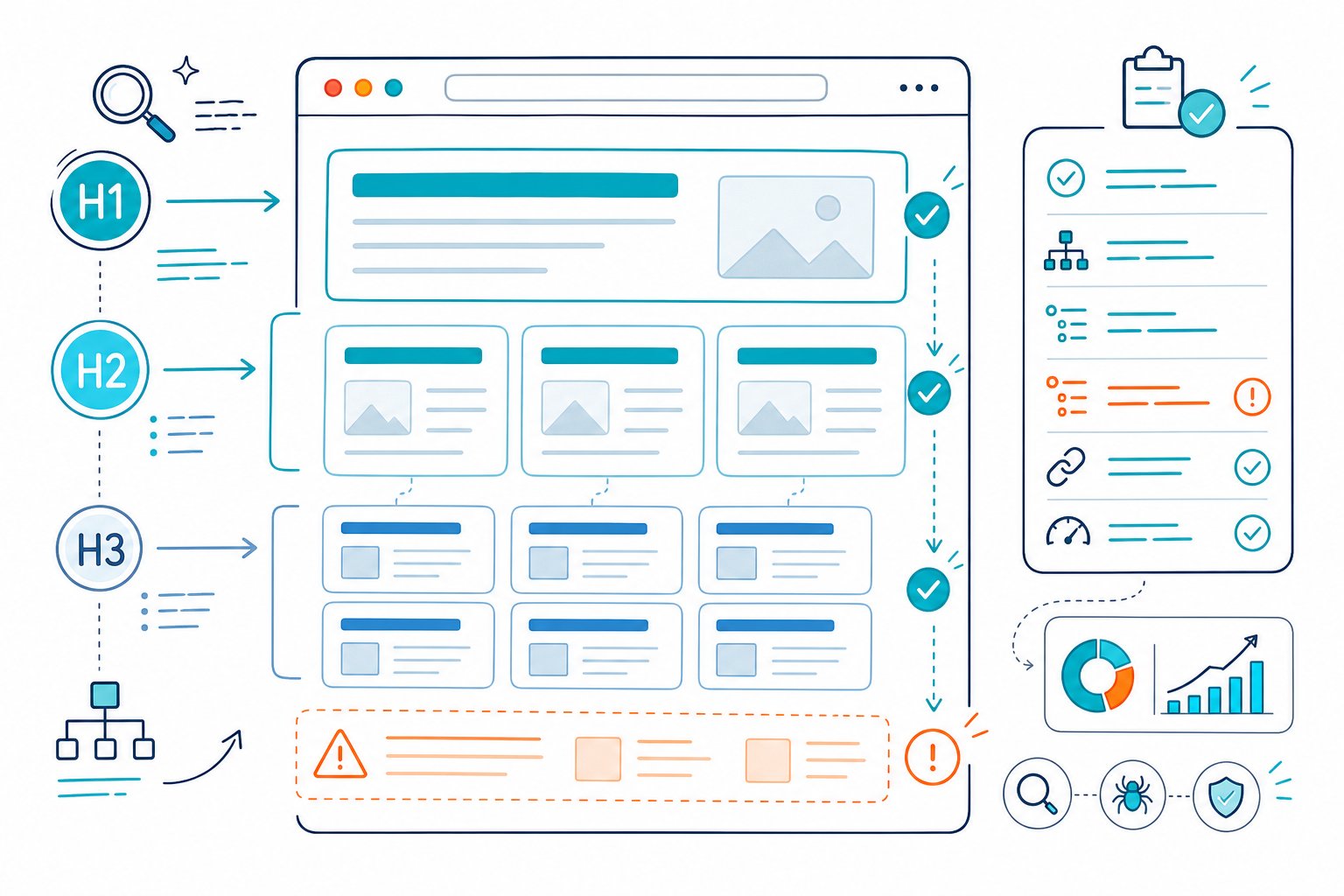
When you audit heading tags, focus on the rendered page, not just the CMS editor. Templates, page builders, accordions, and reusable blocks can add hidden or duplicate headings that change the visible document outline.
Build a Logical, Accessible Content Outline
Use heading levels to create a clear content hierarchy: one primary page topic, major sections beneath it, and detailed subsections where readers need more depth. This structure improves readability, helps screen readers navigate, and gives search engines stronger context around your primary keyword and related terms.
What Should the Primary H1 Communicate?
Your H1 should state the page’s main topic and closely match the search intent behind it. For a service page, include the service and location when location drives demand. For a tutorial, name the task or question you’re helping readers tackle.
Use one H1 per page as your default editorial standard. Multiple H1s can appear on modern HTML templates, but a single clear H1 makes audits, CMS governance, and page structure much easier to manage.
A strong H1 is descriptive and specific:
- Weak:
SEO Services - Strong:
Technical SEO Services for Ecommerce Websites - Strong:
How to Analyse H1, H2 and H3 Heading Structure
Keep your primary keyword natural. Your title tag can use a different variation when you want a stronger hook in search results.
How Do H2s and H3s Support Search Intent?
H2s divide your page into the major questions or tasks a visitor expects. H3s add detail beneath the relevant H2, such as steps, examples, exceptions, or criteria.
Think of the outline like a book:
- H1: The main topic
- H2: A major part of that topic
- H3: A supporting point within that major part
- H4 through H6: Deeper layers where the content needs them
Your headings should describe the content that follows. Generic labels such as “More Information” give readers very little to work with and send weak topical signals. Clear headings also improve scannability, which supports content readability for SEO.
When Should You Use H4, H5, and H6?
Use H4, H5, and H6 only when the content has a genuine nested relationship that needs another level of structure. A complex tutorial, documentation page, or large category page may need an H4 beneath an H3.
Don’t add deeper heading levels just to create visual variety. If a section needs an H4, make sure an H3 introduces the parent topic first. Jumping from H2 to H4 breaks the logical hierarchy and makes the document outline harder to follow.
In practice, most service pages and blog posts work well with H1, H2, and H3. Deep nesting often suggests that you should split a long page into clearer sections or supporting pages.
Why Headings Must Not Be Used for Styling
Choose heading tags for semantic structure and use CSS for visual styling. An H6 heading is still a sixth-level heading, even if your design makes it look large and bold.
This distinction supports WCAG 2.1 Success Criterion 1.3.1, which requires information and relationships to be available programmatically. Screen reader users can navigate headings with the H key in NVDA and JAWS, so using a heading as decorative text creates misleading navigation.
Use a paragraph, <div>, or styled text for labels that don’t introduce a new section. Reserve H1 through H6 for real content hierarchy.
Audit and Fix Heading Problems on Live Pages
Audit headings on the live rendered page, then fix structural errors in the CMS or template where they originate. A heading analyzer should reveal the tag level, heading text, order, visibility, and parent-child relationship across the page.
Start with the most serious structural errors, check how the browser renders the page, test accessibility, and then measure whether the revised structure improves search visibility and user engagement.
Which Heading Errors Should You Prioritize First?
Fix issues in this order:
- Missing H1: Add one descriptive H1 that reflects the primary topic and search intent.
- Empty headings: Remove empty tags or add meaningful heading text.
- Skipped heading levels: Restore the parent level, such as adding an H3 before an H4.
- Multiple H1s: Keep the strongest page title as the primary H1 and convert template headings where appropriate.
- Weak or vague headings: Rewrite headings so they describe the section and cover needed related topics.
A weak heading structure rarely causes a ranking collapse on its own. It often appears alongside thin sections, weak internal links, poor content depth, and an unclear topical focus. Use a missing topics content audit to see whether your H2s also overlook important questions.
How Can You Check Rendered Headings in a CMS?
Inspect headings after publishing or previewing the page in your browser. CMS editors can show an H2 selection while the theme, page builder, or component library inserts a different tag on the frontend.
Check these areas during your heading audit:
- Main content area
- Navigation menus and footer widgets
- Accordion titles and FAQ blocks
- Product tabs and related-content modules
- Hidden mobile elements
Check Page SEO analyzes the active page in Chrome, so you can review heading hierarchy on live pages, staging environments, CMS previews, and pages behind login walls. That makes it easier to catch template-level SEO issues before they reach production.
How Do You Validate Accessibility and Crawlability?
Validate your heading structure with both a browser-based accessibility check and a crawl. WAVE and axe DevTools help you find accessibility issues in the rendered DOM, while Screaming Frog helps identify recurring missing H1s, duplicate H1 text, and skipped heading levels across many URLs.
Also inspect the page manually. Crawlers read HTML structure, while users experience headings after JavaScript, CSS, consent tools, and page-builder scripts load.
For important service pages and tutorials, confirm that your heading hierarchy supports the content visible near the top of the page. A clear H1 and useful first H2 give readers an immediate path into the page.
How Should You Measure the SEO Impact of Changes?
Benchmark performance before publishing heading changes, then compare equal date ranges after Google has crawled and processed the update. Google Search Console is your go-to here: track impressions, clicks, CTR, average position, and the queries connected to that URL.
Where possible, measure one meaningful heading change at a time. For example, revise vague H2s to cover missing subtopics, record the publish date, and compare the four weeks before with the four weeks after, using equivalent days of the week.
Watch for these results:
- More impressions for related queries
- Higher CTR after improving search intent alignment
- Better average position for the primary topic
- Stronger engagement or conversions from organic visitors
For pages with larger gaps, use heading changes alongside content improvements, internal links, and metadata updates. You can also optimise existing web page content after identifying weak sections and thin supporting copy.
For a faster live audit, Download the Check Page SEO Chrome extension and check your rendered H1, H2, H3, technical signals, and competitor page structure while you browse.